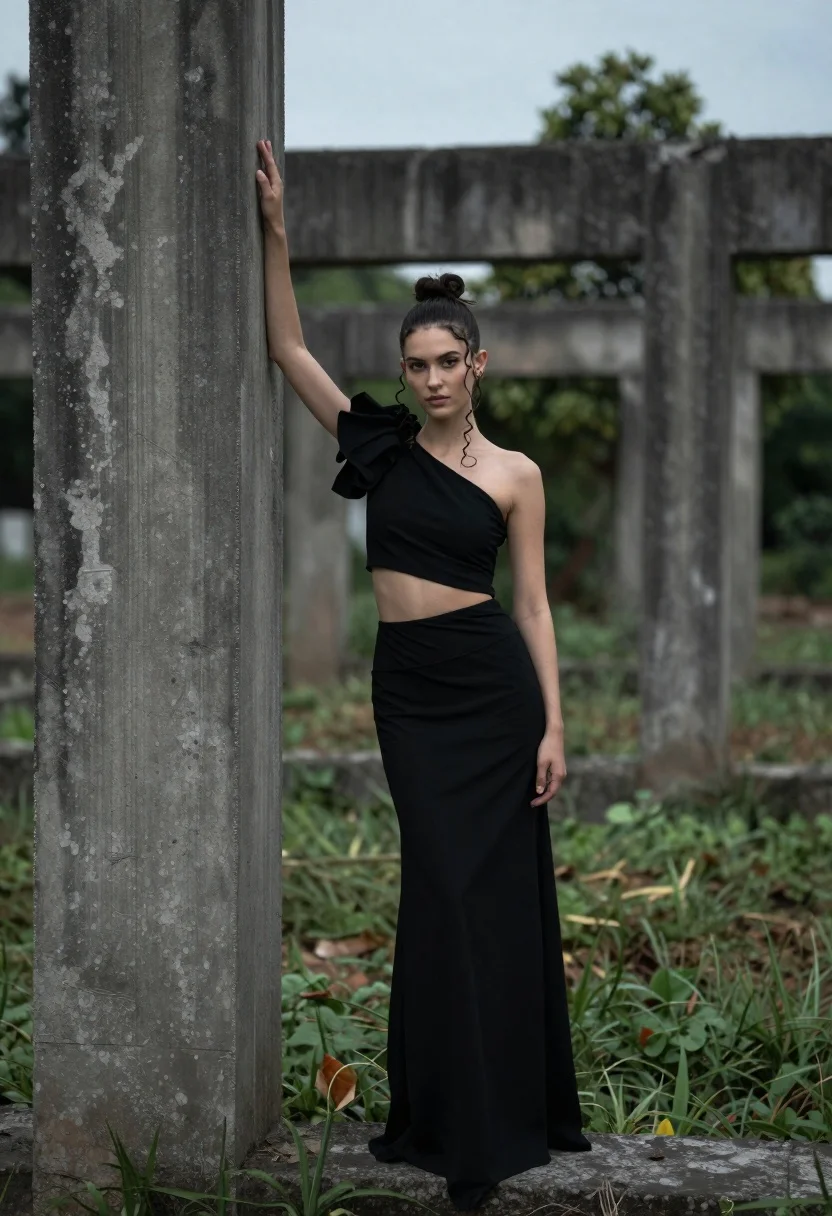
Young woman in black outfit between weathered concrete pillars outdoors
Prompt
A young woman stands in a dramatic pose between two large, weathered concrete pillars in an outdoor setting.

Subject: A young woman with dark hair pulled back into a high bun and loose curls framing her face, featuring fair skin and a serious, direct gaze.

Clothing: She wears a sophisticated black two-piece ensemble consisting of a one-shoulder crop top with a large draped fabric detail on the shoulder and a matching long, flowing skirt that pools around her feet.

Action: The woman stands with her body angled slightly away from the camera while turning her head to look forward; she rests one hand against the concrete pillar beside her while her other arm hangs loosely by her side.

Environment: The setting is an open area featuring large, dark, weathered concrete structures that resemble old ruins or industrial foundations, surrounded by low-lying green ground cover and a blurred background of trees under a soft, overcast sky.

Camera: The shot is taken from a medium-full length perspective with a shallow depth of field that keeps the subject sharp while blurring the background elements to create separation.

Lighting: The scene is lit with soft, diffused natural light typical of an overcast day, creating gentle shadows and a muted, moody atmosphere without harsh highlights.

Style Details: The image has a cinematic color grading style with desaturated tones, high contrast between the dark clothing and the grey concrete, and a polished, editorial photography aesthetic.
Description
This prompt is useful for creating dramatic fashion editorials, architectural portraiture, and moody concept art pieces that emphasize texture. The combination of 'soft, diffused natural light' with 'high contrast between the dark clothing and the grey concrete' ensures the subject remains visible against the weathered backdrop without harsh shadows obscuring the details of the 'draped fabric detail', which is crucial for a polished aesthetic.
Suggestions
- Change 'dark hair pulled back into a high bun' to 'loose, windswept curls' for more movement.
- Swap 'weathered concrete pillars' for 'oxidized steel columns' to alter the material contrast.
- Adjust 'desaturated tones' to include 'subtle sepia wash' for an aged film look.
Category
Tags
BrunetteFair SkinFemaleMedium ShotOutdoorsRealisticRuins
Date added
June 19, 2026
Added by
PromptDexter Team
Related Prompts
More prompts with similar categories and tags.

Young woman seated in leather chair outdoors with green foliage background

Smiling woman with red hair in floral twotoned dress outdoors
Woman in black corset on concrete terrace overlooking green hills

Young woman in white crop top and black mini skirt against brown
Young woman adjusting ponytail on wide sandy beach under overcast sky

Blonde woman in swimsuit by yacht window overlooking blue sea

Woman in fuchsia saree posing against textured beige stone wall

Smiling woman in burgundy satin gown by white architectural pillar

Young woman with braided hair in misty woodland setting
Young woman in floral dress against textured grey concrete wall