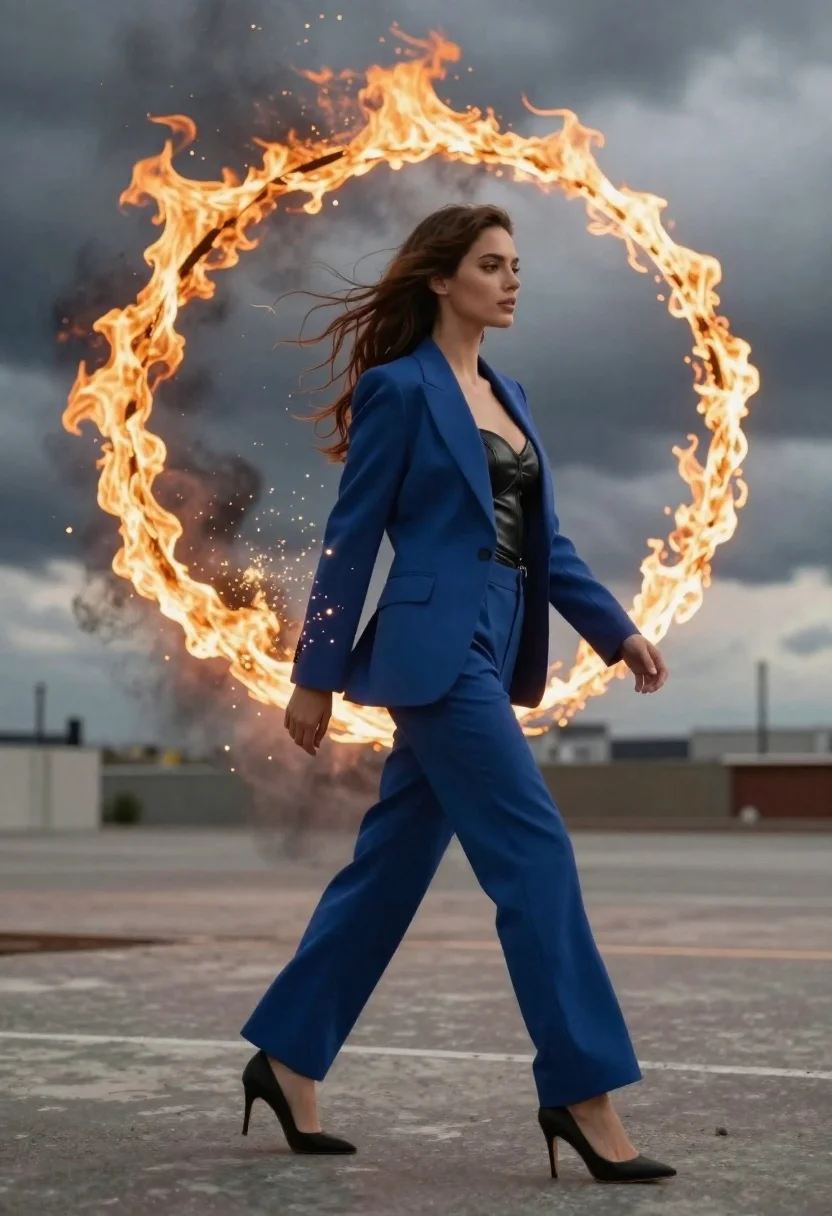
Young woman in blue blazer walking forward in profile against a ring
Prompt
A woman walks forward in profile against a dramatic backdrop of a glowing ring of fire and swirling smoke.

Subject: A young woman with long, wavy brown hair flowing in the wind, wearing a confident expression as she gazes to the side.

Clothing: She wears a sharp royal blue blazer over a black leather bustier top, paired with matching wide-leg trousers and black high heels.

Action: The figure is captured mid-stride walking forward, while her left side dissolves into a magical swirl of golden sparks and dark smoke particles.

Environment: A desolate, grey concrete landscape under a heavy, stormy sky filled with dark clouds.

Camera: Shot from a low angle emphasizing the subject's height, utilizing a shallow depth of field to blur the distant background slightly.

Lighting: Dramatic high-contrast lighting where the bright ring of fire illuminates the scene against the moody, overcast atmosphere.

Style Details: Cinematic fantasy aesthetic with hyper-realistic textures and a dynamic composition blending reality with magical effects.
Description
This prompt is useful for creating cinematic fantasy concept art, editorial fashion spreads with supernatural elements, and dramatic movie poster key art. The combination of 'low angle' perspective and 'dramatic high-contrast lighting' ensures the subject dominates the frame against the volatile backdrop, while specifying 'hyper-realistic textures' prevents the magical effects from looking like simple digital overlays.
Suggestions
- Change 'royal blue blazer' to 'deep emerald blazer' for a richer color contrast.
- Add 'volumetric smoke' to enhance the swirling effect around her feet.
- Swap 'concrete landscape' for 'cracked obsidian ground' to match the dramatic tone.
Category
Tags
Brown HairCasual WearFemaleFull BodyLow AngleOutdoorsRealisticSide Profile
Date added
June 26, 2026
Added by
PromptDexter Team
Related Prompts
More prompts with similar categories and tags.

Confident woman in black dress walks through elegant museum hallway adjusting sunglasses
Young woman in black dress standing on stone steps before classical building

Young woman in traditional embroidered attire standing in a lush green meadow
Woman crawling on dusty hillside in black leather outfit low angle
Glamorous woman in black gold outfit posing in concrete subway tunnel

Blonde woman in black gown posing on city street near ritz london
Ballerina en pointe on dark wet rocks near massive icebergs at coast
Woman in maroon dress standing in luxurious stone corridor outdoors