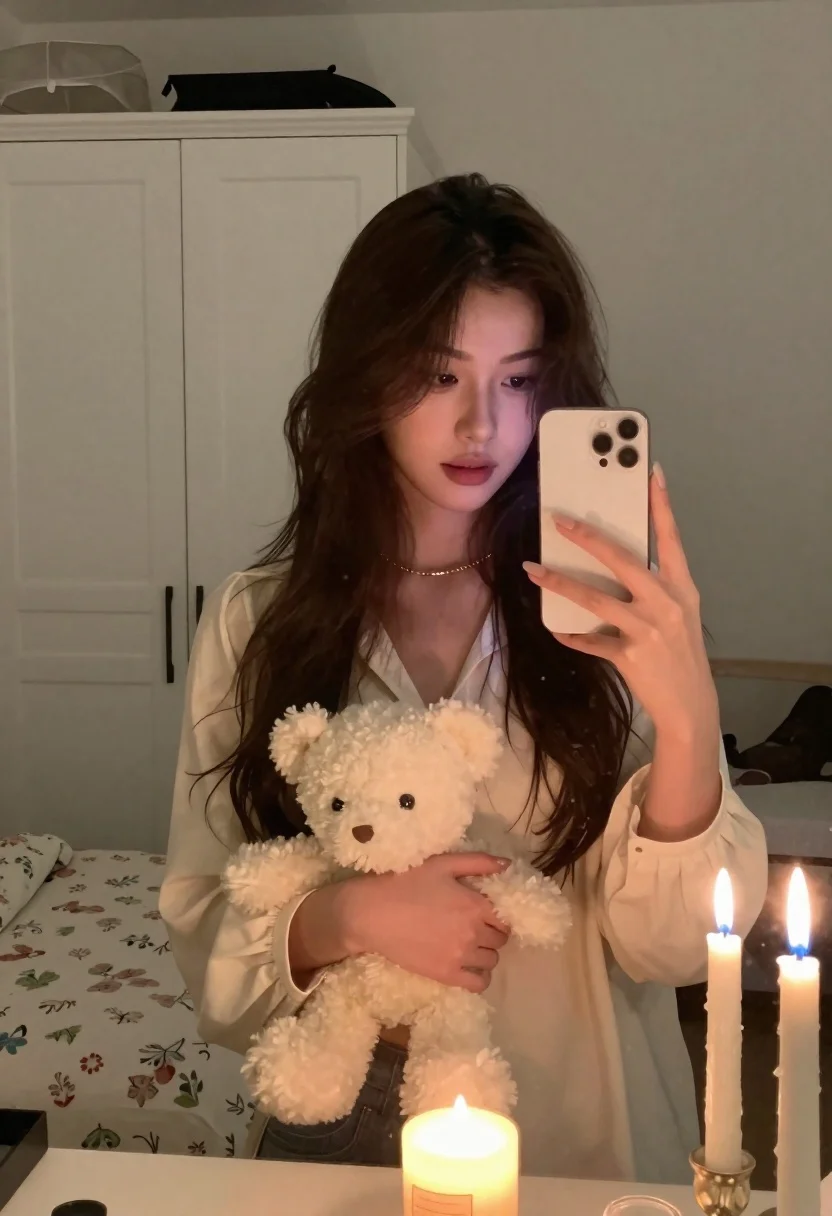
Young woman in cream blouse holding white teddy bear for mirror selfie
Prompt
A young woman with long dark wavy hair takes a mirror selfie holding a white smartphone in her right hand while cradling a small white teddy bear against her chest.

Subject: A young woman with long, dark brown wavy hair and soft features looking down at the phone screen.

Clothing: She wears a loose-fitting cream-colored blouse with a V-neckline and gathered cuffs, accessorized with a thin gold chain necklace.

Action: She holds a white smartphone up to capture her reflection in the mirror while gently holding a small white teddy bear against her chest with her left arm.

Environment: The setting is a cozy bedroom featuring a white wardrobe in the background, a bed with floral-patterned bedding, and a large vanity mirror reflecting the room.

Objects: A lit candle sits on the vanity surface in the foreground, flanked by two tall candles in glass holders to the right.

Lighting: The scene is illuminated by warm ambient light from the candles, creating soft shadows and a cozy atmosphere.

Camera: The shot is framed as a mirror selfie with a medium close-up perspective capturing the subject from the chest up.

Style Details: The image has a candid, intimate aesthetic with natural skin tones and a focus on soft textures like the blouse and teddy bear.
Description
This prompt is useful for creating intimate lifestyle content, cozy bedroom vignettes, and personal social media storytelling. The combination of 'warm ambient light from the candles' and the 'loose-fitting cream-colored blouse' establishes a soft, domestic mood that complements the candid nature of a mirror selfie while ensuring the visible textures of the teddy bear and bedding remain detailed rather than being washed out by harsh lighting.
Suggestions
- Change 'dark brown wavy hair' to 'curled dark brown hair' for more volume.
- Swap 'floral-patterned bedding' for 'solid beige bedding' to simplify the background.
- Add 'bokeh effect' to the camera details for a shallower depth of field.
Category
Tags
BedroomBrown HairClose UpFair SkinFemaleMedium ShotPortrait ShotRealistic
Date added
June 21, 2026
Added by
PromptDexter Team
Related Prompts
More prompts with similar categories and tags.
Young woman with brown hair taking mirror selfie in bedroom

Close up portrait of young woman with brown braid indoors

Close up portrait of smiling woman with brown hair resting chin on

Close up portrait of young woman with brown hair and red lipstick
Selfie portrait of woman in cozy living room
Young woman taking a mirror selfie kneeling on wooden bedroom floor

Young woman studying thoughtfully in library with plaid shirt
Young woman in black outfit taking mirror selfie in indoor room