
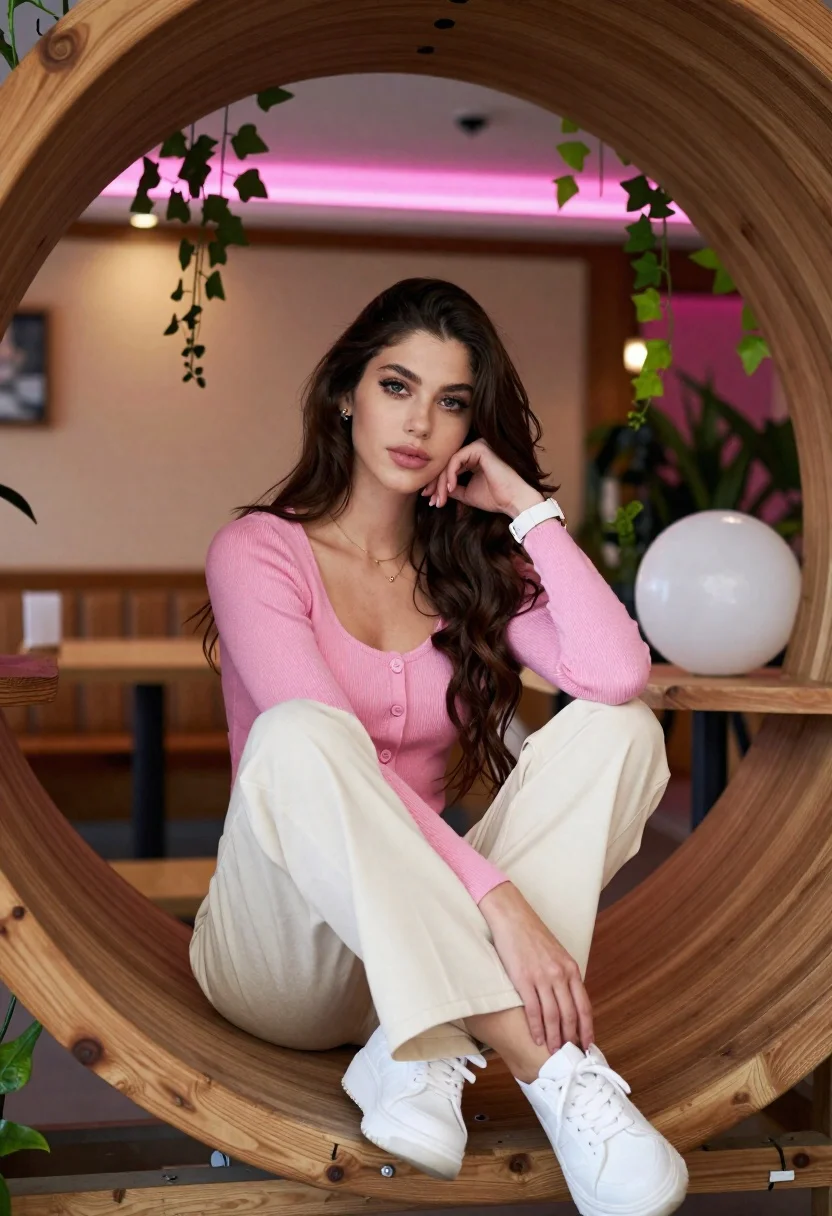
Young woman in pink cardigan sitting inside large wooden circular frame
Prompt
A young woman with long dark wavy hair sits inside a large circular wooden structure, looking directly at the camera with a soft expression.

Subject: A young woman with fair skin, long dark brown wavy hair, defined eyebrows, and light-colored eyes. She has a calm and confident demeanor.

Clothing: She wears a fitted pink ribbed cardigan sweater over a matching top, paired with loose-fitting cream trousers and chunky white sneakers. She is accessorized with a delicate gold necklace, small earrings, and a white wristwatch on her left arm.

Action: She sits in a relaxed pose with one leg bent and the other extended slightly forward. Her right hand rests gently against her cheek while her gaze meets the viewer.

Environment: The setting is an interior space featuring a large wooden circular frame that encloses her, adorned with hanging green ivy vines. Behind her, there are blurred background elements including warm ambient lighting, pink neon accents, and indoor plants. A large white spherical object sits on a shelf to her right.

Camera: The shot is framed as a medium close-up from a slightly low angle, emphasizing the subject within the circular wooden frame with a shallow depth of field that blurs the background.

Lighting: The scene is lit with soft, warm ambient light mixed with cool pink neon highlights in the background, creating a cozy and modern atmosphere with gentle shadows on her face.

Style Details: The image has a high-definition, photorealistic quality with a focus on fashion and lifestyle aesthetics, utilizing natural textures like wood and fabric alongside vibrant color contrasts.
Description
This prompt is useful for creating editorial portraiture, modern lifestyle advertisements, and intimate character studies. The combination of the 'large wooden circular frame' with 'soft, warm ambient light mixed with cool pink neon highlights' directs focus onto the subject while using the contrasting colors to give the image a contemporary, curated feel.
Suggestions
- Change 'pink ribbed cardigan sweater' to 'beige knit cardigan' for a more neutral palette.
- Swap 'green ivy vines' for 'dried eucalyptus' to adjust the natural element's tone.
- Adjust 'medium close-up' to 'waist shot' to better showcase the trousers and sneakers.
Category
Tags
Brown HairCasual WearFair SkinFemaleIndoorsMedium ShotPortrait ShotRealistic
Date added
June 21, 2026
Added by
PromptDexter Team
Related Prompts
More prompts with similar categories and tags.
Woman with chestnut hair reclining on dark couch indoors

Blonde woman in black coat leaning against white wall by window
Studio portrait of woman in black blazer

Professional woman with long dark hair sitting in modern office chair

Woman with brown hair smiling at table with orange drink indoors

Blonde woman in rust knit sweater leaning against textured wall

Woman seated in armchair near large windows with greenery

Young woman in white blouse leaning against beige wall near mirror
