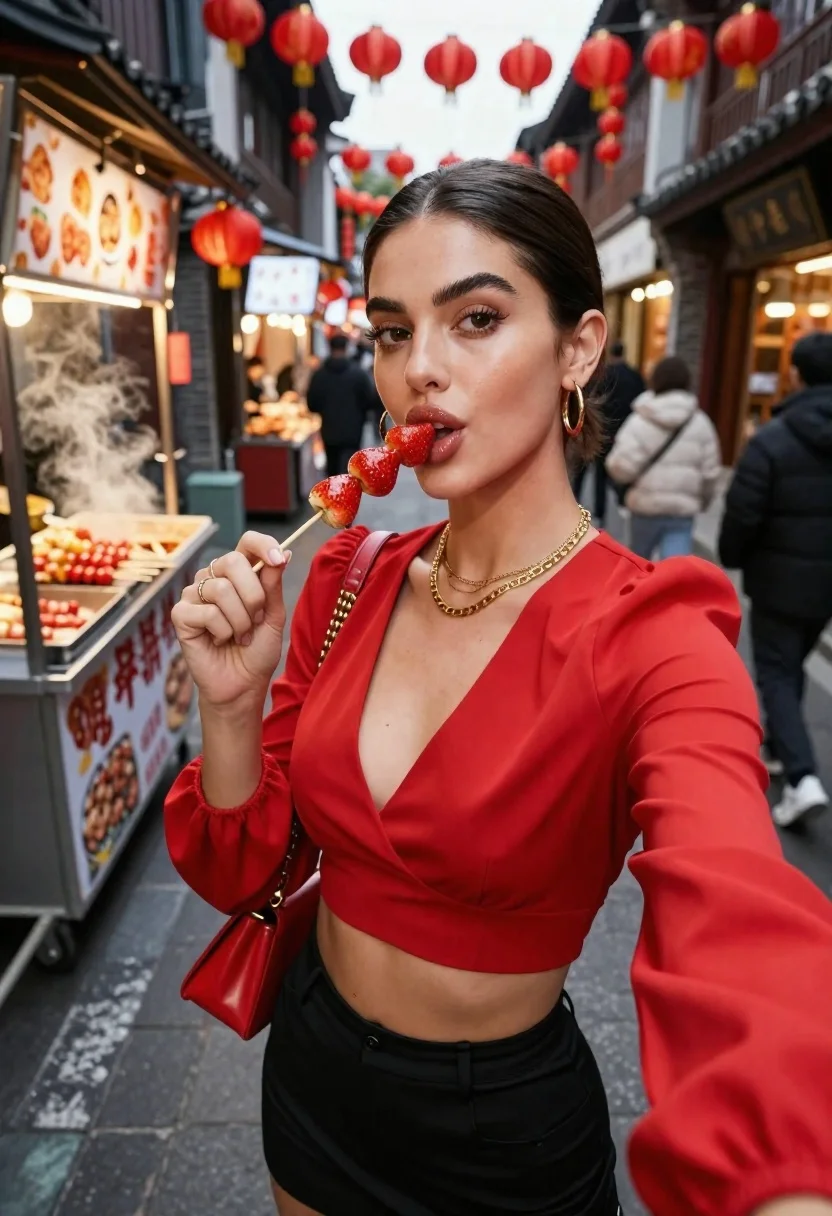
Young woman in red outfit taking selfie with glazed strawberries on street
Prompt
A woman in a vibrant red outfit takes a selfie while holding a skewer of glazed strawberries near her lips.

Subject: A young woman with dark hair slicked back and styled with a side part, featuring defined eyebrows, glossy lips, and gold hoop earrings.

Clothing: She wears a bright red cropped top with wide sleeves and a V-neckline, paired with a black mini skirt. She accessorizes with layered gold necklaces, a ring on her finger, and carries a small red handbag across her body.

Action: She holds a wooden skewer with three glazed strawberries up to her mouth as if about to take a bite, looking directly at the camera with a playful expression.

Environment: The scene is set in a narrow outdoor shopping street lined with traditional buildings and food stalls, decorated with hanging red paper lanterns overhead. Steam rises from a food cart on the left where skewers are being prepared, and other pedestrians walk in the background.

Camera: A close-up selfie angle capturing the subject from the waist up, with a shallow depth of field that blurs the bustling street behind her.

Lighting: Warm ambient light from the lanterns and shop signs creates a soft glow on her face, contrasting with the cooler daylight tones in the background.

Style Details: The image has a vibrant, high-contrast aesthetic with rich reds and warm tones, resembling a polished travel or lifestyle photography style.
Description
This prompt is useful for creating vibrant street food blogs, editorial fashion features centered on accessories, and playful travel vignettes. The combination of 'vibrant red outfit' against the backdrop of 'hanging red paper lanterns' establishes a cohesive color story that draws immediate attention to the subject while the 'shallow depth of field' ensures the focus remains sharply on her face and the strawberries, preventing the busy street from becoming distracting.
Suggestions
- Change 'glazed strawberries' to 'fresh raspberries' for a different texture.
- Swap 'bright red cropped top' for 'velvet red blouse' to change the material feel.
- Adjust 'Warm ambient light' to 'harsh midday sun' for a more dramatic contrast.
Category
Tags
Casual WearClose UpFemaleOutdoorsRealisticSelfieSide ProfileStreet
Date added
June 23, 2026
Added by
PromptDexter Team
Related Prompts
More prompts with similar categories and tags.
Man taking a selfie at a crowded outdoor night eatery

Smiling blonde woman eating tiramisu on an outdoor terrace at dusk

Close up selfie of blonde woman holding steamed bun in dimly lit
Blonde woman eating ice cream by riverbank with city skyline background
Laughing blonde woman at wooden table in japanese food alleyway scene
Young woman eating large burger at vibrant night market table setting
Smiling woman in red patterned dress at busy urban street scene

Couple selfie of smiling woman and man hugging on mountain range at