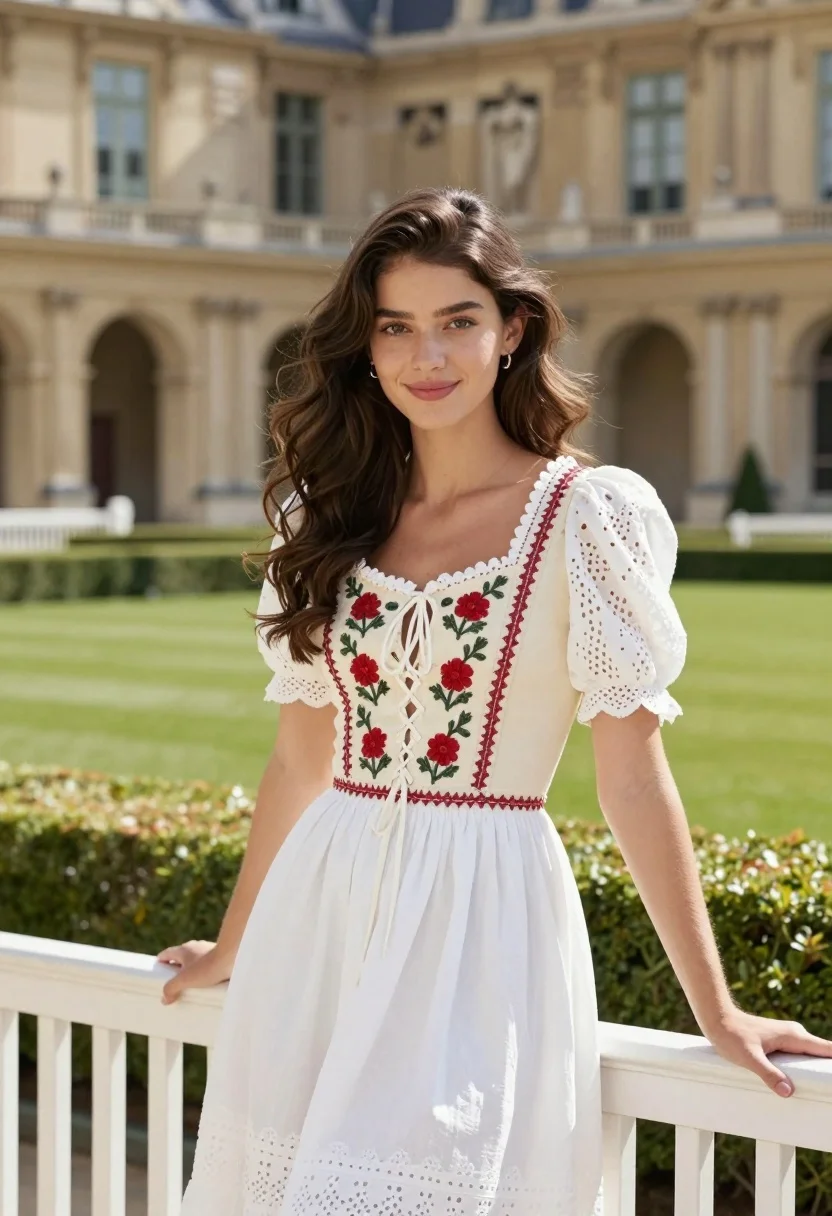
Young woman in vintage dress standing before grand classical architecture garden
Prompt
A young woman with long wavy brown hair stands smiling gently in front of a grand historic building.

Subject: A beautiful young woman with long wavy dark brown hair and soft features.

Clothing: She wears a vintage-style dress featuring a cream bodice with red floral embroidery and lace-up detailing, paired with white eyelet fabric sleeves and a full white skirt.

Action: She stands in a relaxed pose leaning her left hand against a white wooden bench while looking directly at the camera with a soft smile.

Environment: The setting is an elegant outdoor garden featuring manicured green lawns, low hedges, and a large ornate stone building with classical architecture and statues in the background.

Camera: Shot from a medium shot angle capturing the subject from the thighs up with a shallow depth of field that keeps the woman sharp while softly blurring the architectural details behind her.

Lighting: Bright natural sunlight illuminates the scene creating soft shadows and highlighting the texture of the fabric and the stone facade.

Style Details: High-resolution photography with vibrant colors, crisp focus on the subject, and a polished aesthetic reminiscent of fashion editorial or lifestyle portrait work.
Description
This prompt is useful for creating bridal lookbooks, historical costume editorials, and high-end magazine features requiring an elegant outdoor setting. The combination of 'vintage-style dress featuring a cream bodice with red floral embroidery' against the 'ornate stone building with classical architecture' grounds the subject in a specific time and place, while the 'shallow depth of field' ensures the viewer's focus remains on her soft smile rather than getting lost in background detail.
Suggestions
- Change 'red floral embroidery' to 'navy blue embroidery' for a more dramatic contrast.
- Swap 'white wooden bench' for 'marble pedestal' to better complement the architecture.
- Adjust 'medium shot angle' to 'full body shot' to showcase the entire skirt.
Category
Tags
Brown HairBrunetteFemaleFull BodyMedium ShotPortrait ShotRealistic
Date added
August 5, 2026
Added by
PromptDexter Team
Related Prompts
More prompts with similar categories and tags.

Fair skinned woman in black sequined outfit sitting elegantly indoors

Woman in rust gown posing on white step and repeat backdrop

Young woman in black velvet dress looking over shoulder at event
Confident woman in black leather dress by upscale glass entrance
Woman in yellow dress sitting on grand marble staircase with roses
Stylish woman in pink shirt and black trousers against grey studio backdrop
Glamorous woman in red dress framed by beige curtains and olive branches

Blonde woman in burgundy velvet gown holding flower in white studio

Woman seated on mid century chair wearing beige suit
Singer in purple outfit with microphone against violet background