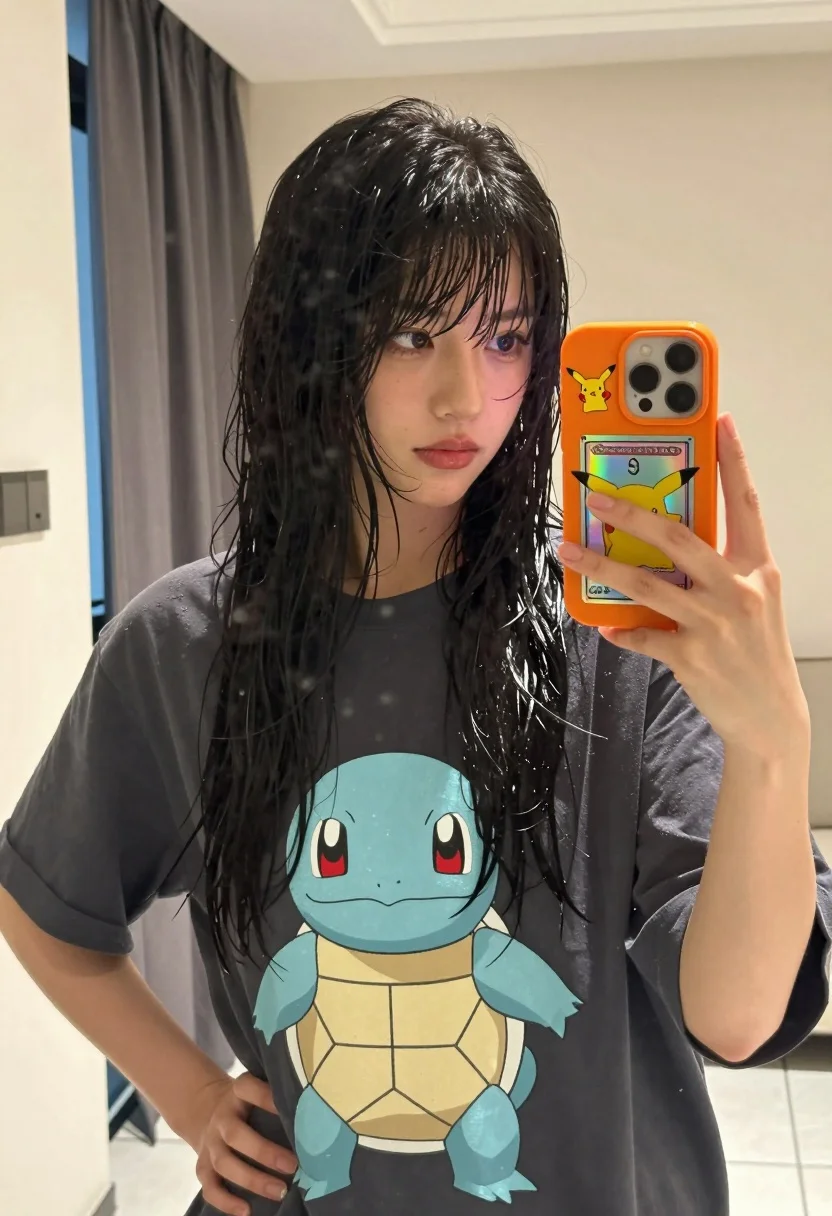
Young woman taking mirror selfie in oversized tshirt indoors
Prompt
A young woman taking a mirror selfie with wet black hair and bangs.

Subject: A young woman with long, wet black hair featuring straight bangs that frame her face, fair skin, and a neutral expression while looking slightly to the side.

Clothing: She wears an oversized dark grey t-shirt with a large white graphic of the Pokémon Squirtle on the front.

Action: She holds an orange smartphone in her left hand against a mirror to take a photo, while her right hand rests on her hip.

Objects: The smartphone has a bright orange case decorated with a Pikachu sticker and a holographic Pokémon card design.

Environment: The setting is a brightly lit indoor room with cream-colored walls, a window covered by sheer dark curtains in the background, and tiled flooring visible at the bottom.

Lighting: Natural daylight streams through the window, creating soft highlights on her wet hair and illuminating the scene evenly.

Camera: A close-up mirror selfie shot taken from a slightly low angle, capturing the subject from the waist up with a shallow depth of field that keeps the focus sharp on her face and upper body.

Style Details: The image features a realistic, high-definition aesthetic with natural skin textures and vibrant colors, typical of modern smartphone photography.
Description
This prompt is useful for creating casual Instagram content, character concept art featuring pop culture references, and lifestyle mood boards mimicking candid snapshots. The combination of 'wet black hair' and the 'oversized dark grey t-shirt' grounds the image in relatable modern aesthetics, while the 'low angle' mirror selfie composition mimics authentic smartphone photography by keeping the focus sharp on her face despite the visible environment.
Suggestions
- Change 'Pokémon Squirtle' to a specific band logo for a different aesthetic.
- Swap 'bright orange case' for a matte black phone case to mute the color pop.
- Adjust 'natural daylight' to 'soft box lighting' for more controlled studio feel.
Category
Tags
Black HairCasual WearClose UpFair SkinFemaleIndoorsLow AngleRealistic
Date added
July 12, 2026
Added by
PromptDexter Team
Related Prompts
More prompts with similar categories and tags.

Close up selfie of blonde woman in pink tank top indoors

Close up portrait of young woman with brown braid indoors
Young woman taking mirror selfie in white sports bra indoors

Young woman taking a selfie seated in a car interior during daylight

Young woman taking a mirror selfie in a modern bedroom setting
Close up portrait of young woman in car with brown hair

Selfie of young woman in airplane cabin with strawberry blonde hair
Young woman with brown hair taking a selfie in bed at night
Close up selfie of young woman with dark hair in white graphic
Close up mirror selfie of young woman in sailor collar at dimly