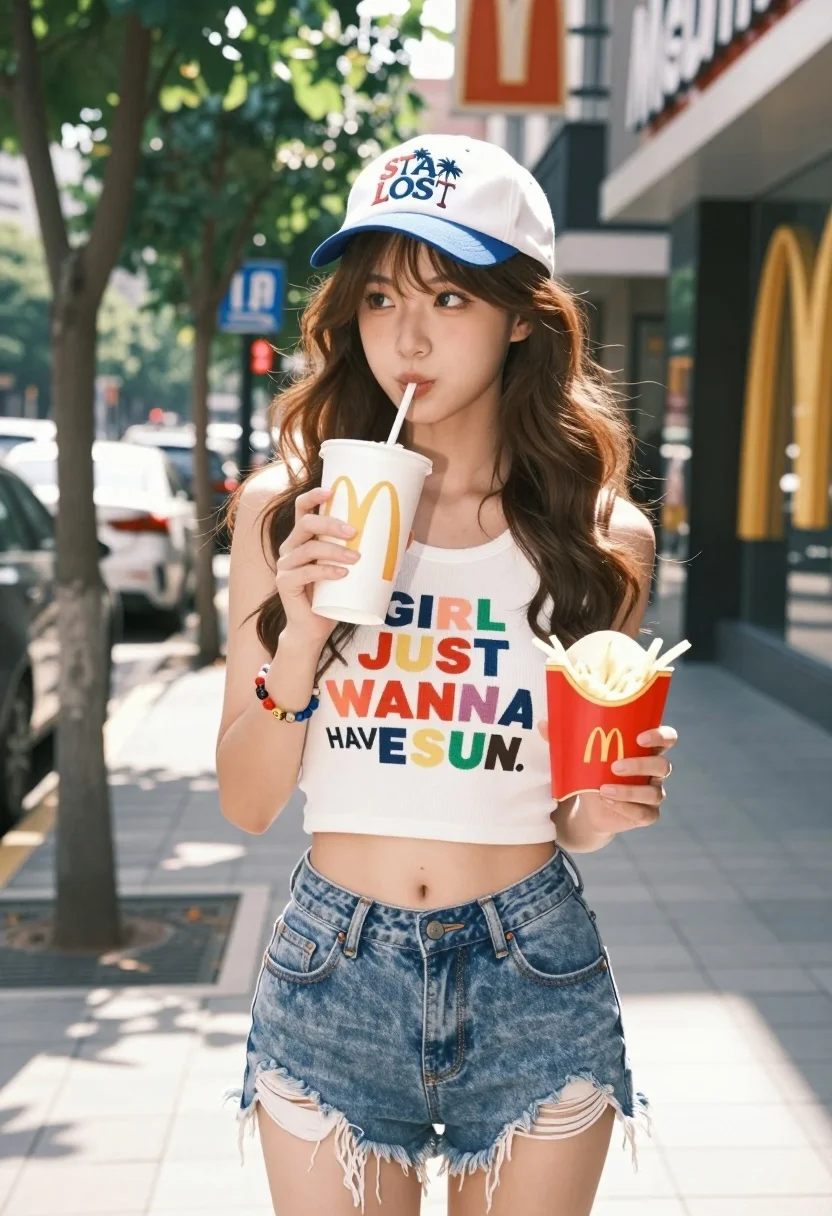
Young woman with brown hair sipping drink on sunny city sidewalk
Prompt
A young woman with long wavy brown hair stands on a sunny city sidewalk sipping from a McDonald's drink cup while holding fries in her other hand.

Subject: A young woman with long wavy brown hair and bangs, wearing a white baseball cap with blue brim and text reading "STAY LOST" along with palm tree graphics.

Clothing: She wears a white ribbed crop tank top featuring the colorful text "GIRL JUST WANNA HAVE SUN" and distressed denim shorts with frayed hems.

Action: She is sipping from a straw while looking off to the side, holding a McDonald's drink cup in one hand and a container of fries in the other.

Environment: An urban street scene with parked cars on the left, trees lining the sidewalk, and a McDonald's restaurant storefront visible on the right.

Camera: Medium shot capturing the subject from mid-thigh up, with a shallow depth of field blurring the background to emphasize the foreground figure.

Lighting: Bright natural daylight casting soft shadows, creating a warm and vibrant summer atmosphere.

Objects: A white cup with orange branding held in her right hand, a container of french fries held in her left hand, and a colorful beaded bracelet on her wrist.

Style Details: High-resolution photography with realistic textures, vibrant color saturation, and a clean modern aesthetic typical of lifestyle fashion imagery.
Description
This prompt is useful for creating casual street style editorials, summer lifestyle blogs, and relatable character portraits. The combination of 'bright natural daylight casting soft shadows' with the specific inclusion of recognizable brand items like a 'McDonald's drink cup' grounds the image in an accessible reality, while the 'shallow depth of field' ensures the focus remains tightly on the subject despite the busy 'urban street scene'.
Suggestions
- Change 'white ribbed crop tank top' to 'oversized graphic tee' for a more relaxed feel.
- Swap 'McDonald's drink cup' for an iced coffee tumbler to elevate the aesthetic.
- Adjust 'bright natural daylight' to 'late afternoon sun' for longer shadows.
Category
Tags
Brown HairBrunetteFemaleMedium ShotOutdoorsRealisticStreetUrban
Date added
August 5, 2026
Added by
PromptDexter Team
Related Prompts
More prompts with similar categories and tags.

Young woman leaning against white wall with beige handbag under bright sunlight

Young woman in black and white patterned outfit on urban rooftop
Young woman leaning against blue car hood in brown leather jacket
Young woman in black t shirt and green jacket on an urban
Confident woman in floral twopiece outfit on paved outdoor walkway
Smiling young woman in cream dress near large glass window outdoors

Young woman in green jacket holding plush toy at festive carousel
Confident young woman in red soccer jersey standing before colorful graffiti wall
Young woman in black camisole and leather pants outdoors under bright daylight
Confident young woman in white vest against blurred urban background