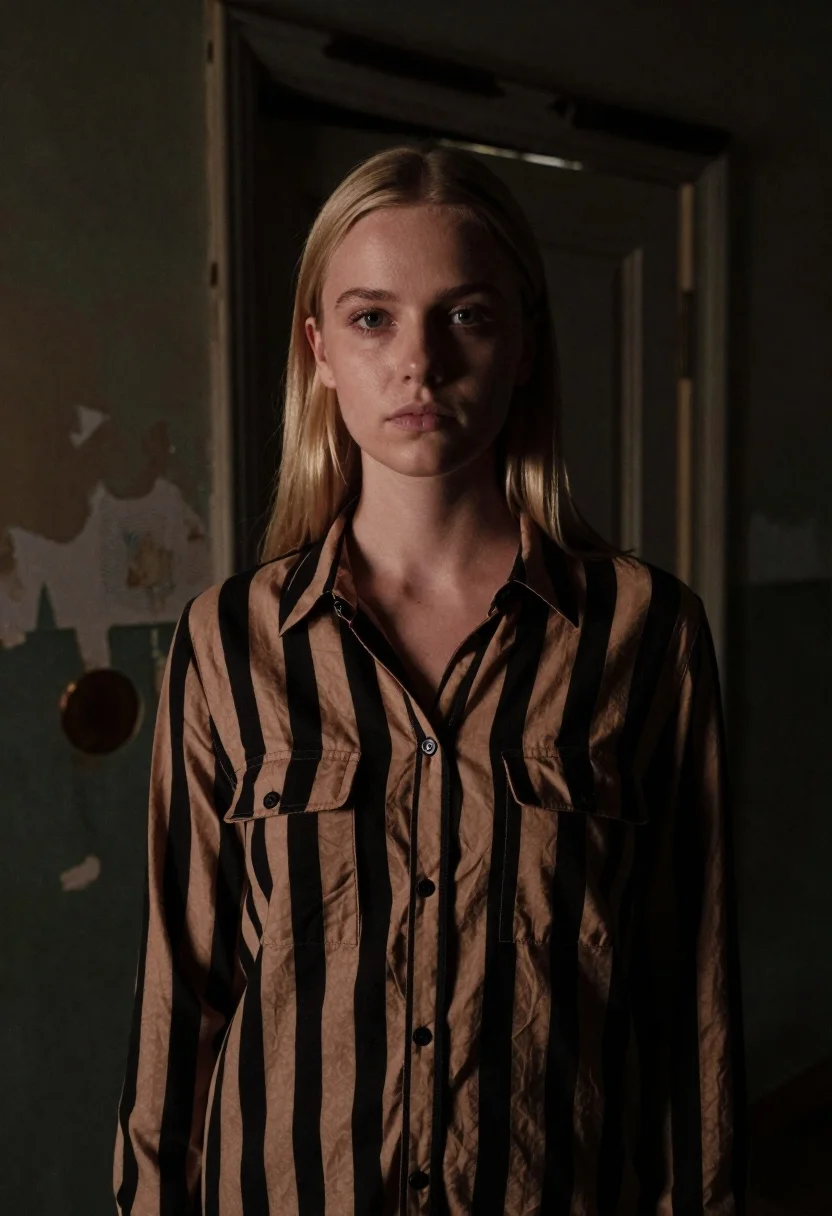
Fair skinned woman with straight blonde hair in striped shirt inside dimly
Prompt
A portrait of a young woman with straight blonde hair standing in a dimly lit, dilapidated room.

Subject: A fair-skinned woman with long, straight blonde hair parted in the middle, looking directly at the camera with a neutral expression and soft makeup.

Clothing: She wears a button-down shirt featuring bold vertical stripes in black and tan or camel color, with two chest pockets.

Environment: The background is a dark, decaying interior space with peeling paint on the walls and a weathered wooden door frame visible behind her right shoulder.

Lighting: Dramatic, low-key lighting creates deep shadows against the wall to her left, highlighting her face and the texture of the shirt while casting a moody atmosphere.

Camera: A medium close-up shot taken from a slightly low angle with a shallow depth of field that keeps the subject sharp while blurring the background details.

Style Details: The image has a cinematic, film-like quality with high contrast, grainy texture, and a muted color palette emphasizing earth tones and blacks.
Description
This prompt is useful for creating character portraits for neo-noir thrillers, moody editorial spreads, or atmospheric concept art for independent films. The combination of 'dramatic, low-key lighting' casting deep shadows against the wall to her left and the 'grainy texture' anchors the image in a specific cinematic era, preventing the scene from feeling too clean or brightly lit.
Suggestions
- Change 'black and tan or camel color' to 'deep burgundy and charcoal' for richer contrast.
- Swap 'dilapidated room' for 'abandoned library' to change the background texture.
- Adjust 'low angle' to 'eye-level' if you want a more confrontational gaze.
Category
Tags
BlondeCasual WearDark SkinFair SkinFemaleIndoorsLow AngleMedium ShotRealistic
Date added
June 26, 2026
Added by
PromptDexter Team
Related Prompts
More prompts with similar categories and tags.
Blonde woman in teal slip dress leaning on elevator handrail

Young woman in beige mini dress looking back at camera on subway
Young woman in school uniform looking back over shoulder down hallway
Fair blonde woman in red dress and floral jacket indoors

Young woman in white blouse leaning against beige wall near mirror
Medium close up portrait of blonde woman in grey cardigan indoors

Woman in green satin slip dress standing in sunlit elegant interior room
Blonde woman at a bar counter in dimly lit pub