
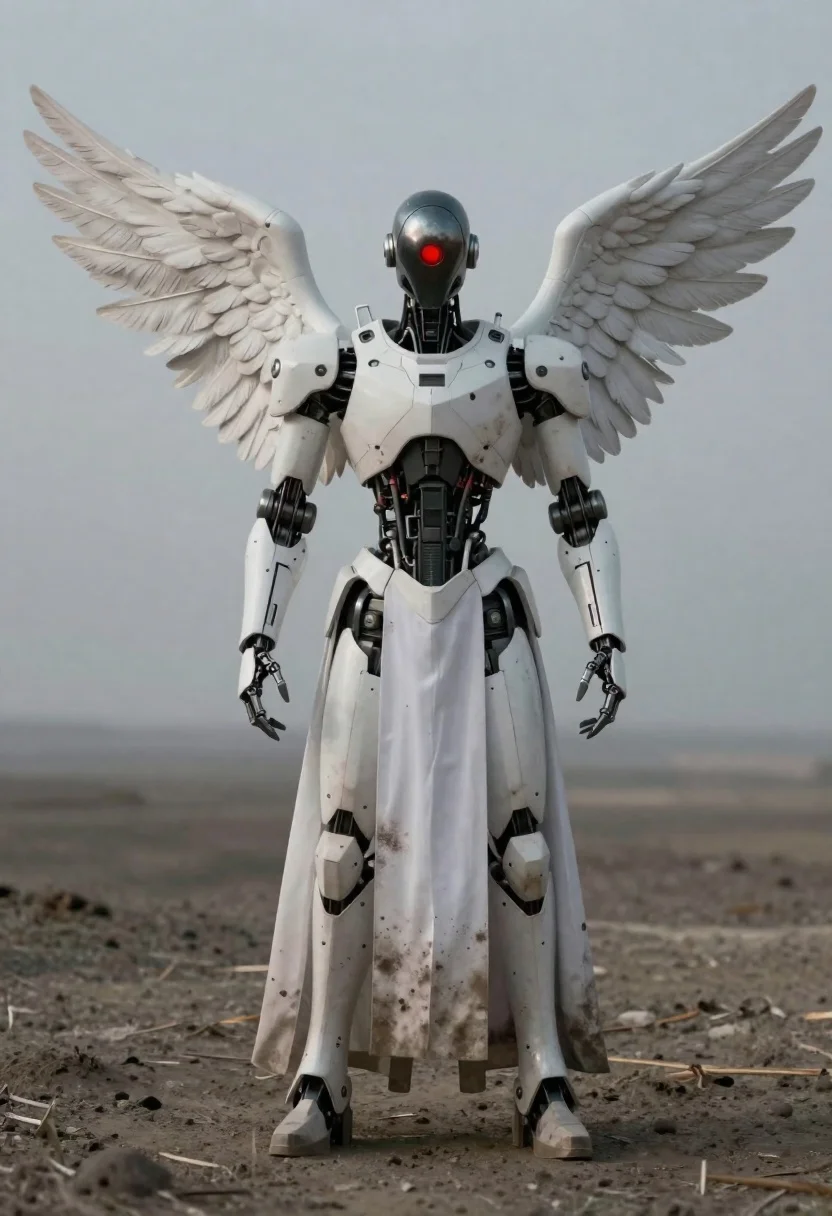
Full body shot of humanoid robot with white wings standing in desolate
Prompt
A full-body shot of a humanoid robot standing in a desolate landscape with large white feathered wings attached to its back.

Subject: A tall, bipedal robot with a sleek, metallic head featuring a single glowing red ring for an eye and a smooth, dark faceplate. The upper torso is covered in segmented white armor plating that reveals exposed mechanical joints and internal wiring at the midsection. Large, detailed white wings are spread slightly outward from the shoulder blades.

Clothing: A long, flowing white robe or gown drapes over the lower body and legs, appearing weathered with dirt stains and texture marks on the fabric. The arms are bare metal with articulated fingers ending in mechanical claws.

Action: The robot stands upright and still, facing forward with a neutral posture, its gaze directed straight ahead through the glowing red eye ring.

Environment: A barren, dusty terrain under an overcast, muted sky, suggesting a bleak or post-apocalyptic setting with a soft horizon line in the background.

Camera: A medium-full shot capturing the entire figure from head to toe, utilizing a shallow depth of field that blurs the background to emphasize the subject.

Lighting: Soft, diffuse ambient light creates a somber mood, casting gentle shadows and highlighting the metallic sheen of the armor and the texture of the wings.

Style Details: Cinematic composition with a muted color palette dominated by greys and whites, rendered with high detail and a slightly gritty, realistic aesthetic.
Description
This prompt is useful for creating cinematic sci-fi concept art, desolate world building pieces, and character design sheets for dystopian narratives. The combination of 'soft, diffuse ambient light' against the 'muted color palette dominated by greys and whites' ensures that the metallic sheen of the armor remains visible without harsh reflections, while the 'shallow depth of field' isolates the figure against the barren terrain.
Suggestions
- Change 'white feathered wings' to 'tattered black wings' for a more aggressive look.
- Swap 'glowing red ring' for 'single blue optical sensor' to alter the mood.
- Adjust 'overcast, muted sky' to 'dust storm backlit by weak sun' for more drama.
Category
Tags
3dArmorCreatureDark SkinDesertFull BodyMedium ShotOutdoorsRobot
Date added
June 23, 2026
Added by
PromptDexter Team
Related Prompts
More prompts with similar categories and tags.

Futuristic soldier in heavy snowfall on an urban street

Obsidian humanoid in neon cube holding glowing heart
Mandalorian character in pink and gold armor on magenta surface
Black helmeted robot against a solid red background
Two reptilian aliens in a worn spacecraft cockpit

Cyborg woman in hoodie with glowing amber circuitry amidst floating autumn leaves
Cyborg rider on motorcycle in cyberpunk city at night
Futuristic soldier in rainy urban setting