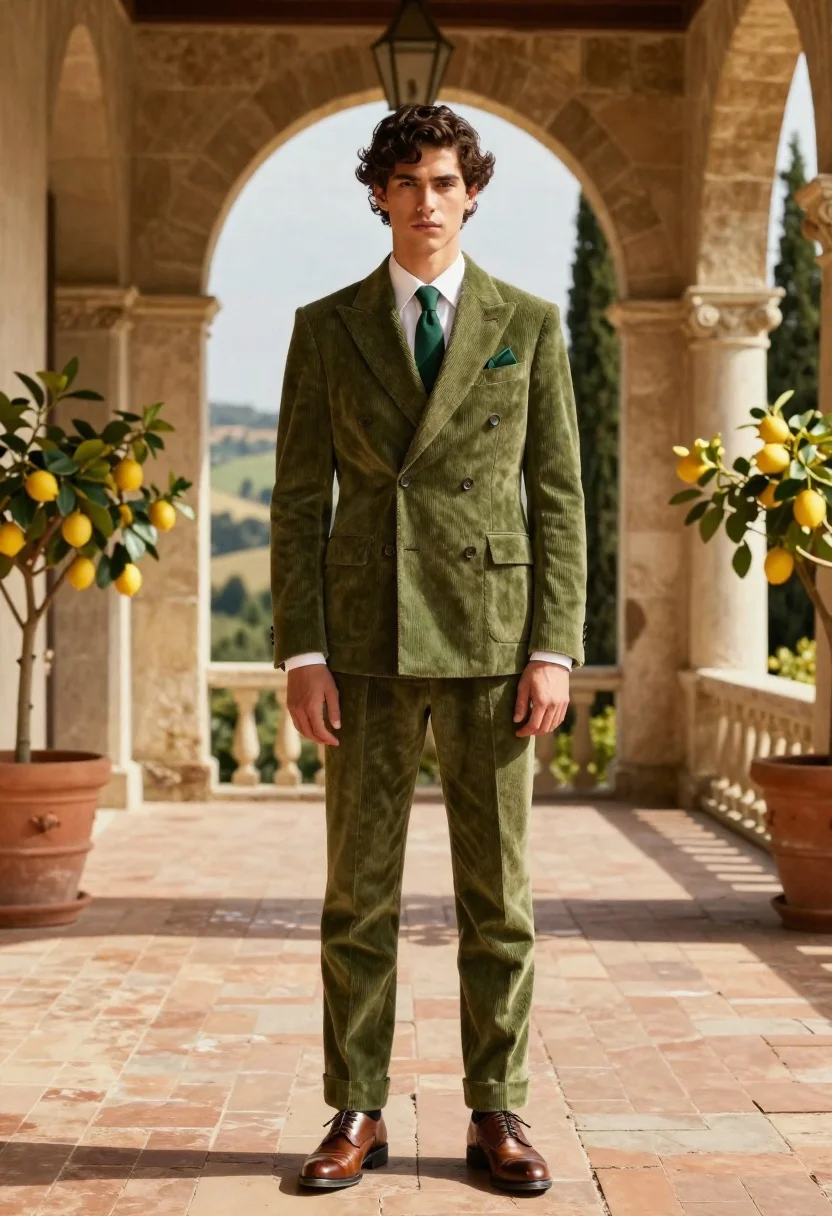
Handsome young man in olive suit on sunlit architectural terrace
Prompt
A full-body portrait of a handsome young man with wavy dark hair standing confidently on a sun-drenched terrace.

Subject: A tall young man with thick wavy dark brown hair and a clean-shaven face featuring a serious, direct gaze.

Clothing: He wears a tailored olive green corduroy double-breasted suit jacket with six buttons and flap pockets, paired with matching trousers cuffed at the ankles. Underneath is a crisp white dress shirt with visible cuffs and a solid dark green tie, complemented by a matching green pocket square. He wears polished brown leather dress shoes.

Action: Standing straight with his arms relaxed at his sides, looking directly forward with a neutral expression.

Environment: An elegant outdoor terrace featuring stone columns with ornate capitals and large arched openings that frame a scenic background of rolling hills and tall cypress trees. Large terracotta pots containing lemon trees with bright yellow fruit are positioned on either side.

Camera: A full-length vertical shot taken from a straight-on eye-level angle, capturing the subject's entire figure against the architectural backdrop.

Lighting: Warm golden sunlight illuminates the scene from the left, casting long soft shadows across the brick floor and highlighting the texture of the corduroy fabric.

Style Details: High-resolution photorealistic rendering with cinematic color grading that emphasizes warm earth tones and natural textures.
Description
This prompt is useful for creating architectural fashion editorials, luxury brand lookbooks, and sophisticated portrait photography showcasing menswear. The combination of 'warm golden sunlight' casting 'long soft shadows' across the 'brick floor' grounds the subject within a tangible space, while specifying the 'olive green corduroy double-breasted suit jacket' ensures the texture remains visible rather than appearing flat under bright light.
Suggestions
- Change 'corduroy double-breasted suit jacket' to 'wool blazer' for a different drape.
- Swap 'lemon trees with bright yellow fruit' for 'bougainvillea' to alter the color palette.
- Adjust 'straight-on eye-level angle' to 'low angle shot' to make the subject appear more imposing.
Category
Tags
Formal WearFull BodyMaleOutdoorsRealistic
Date added
June 19, 2026
Added by
PromptDexter Team
Related Prompts
More prompts with similar categories and tags.
Man in black suit standing on dark volcanic beach at twilight
Woman in emerald green gown standing on an outdoor balcony overlooking trees

Studio portrait of smiling black man in white tuxedo
Stylish man against a dark paneled wall in daylight
Woman in emerald gown on balcony overlooking calm blue ocean sea
Man in black suit adjusting sunglasses against orange background
Young man sitting on ledge in modern cityscape at golden hour
Stylish man against green wall with neon glow
Smiling woman in burgundy satin gown by white architectural pillar

Model walking down rainy city street at night