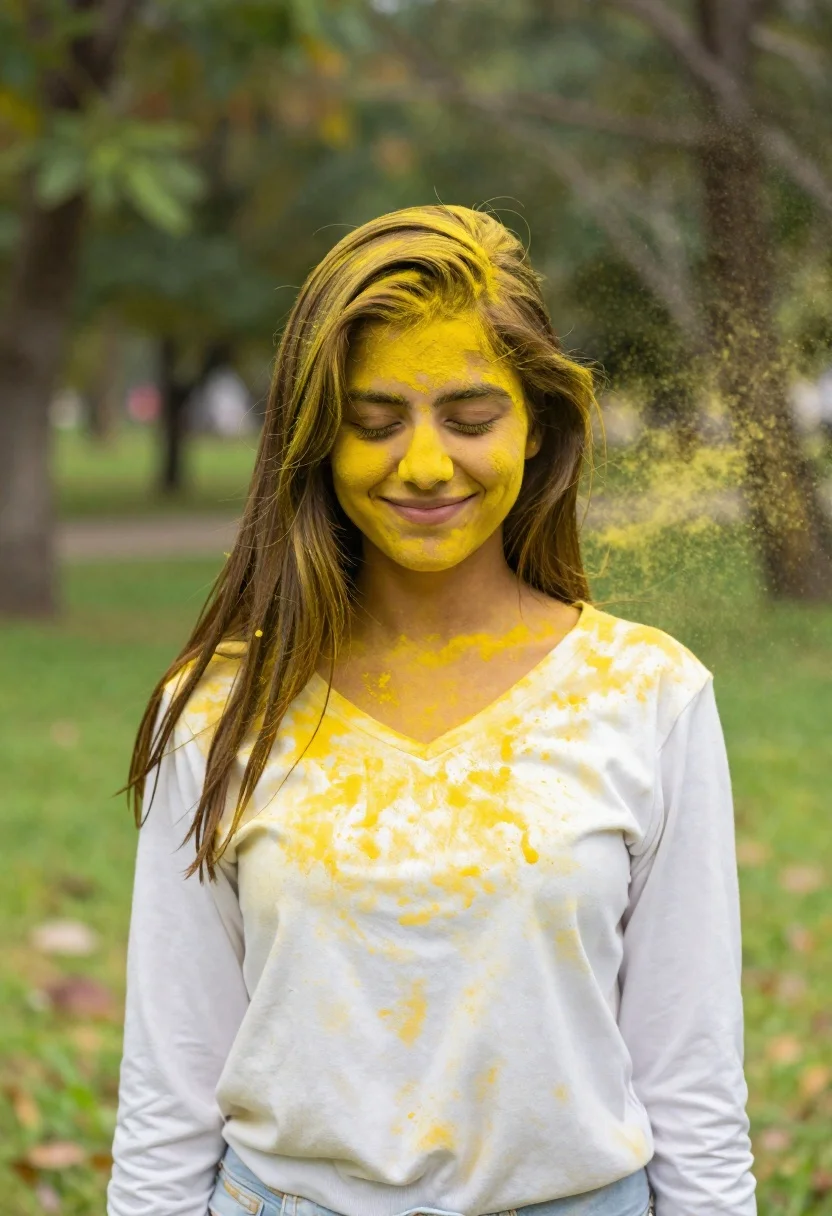
Joyful young woman in white shirt covered in yellow powder in park
Prompt
A joyful young woman with long brown hair stands in a park, her face and white shirt covered in bright yellow powder as she smiles with her eyes closed.

Subject: A young woman with long, straight brown hair that falls over her shoulders. Her skin is dusted with vibrant yellow powder, particularly on her forehead, cheeks, and nose. She has a radiant smile and her eyes are gently closed in delight.

Clothing: She wears a simple white long-sleeved top with a V-neckline. The fabric is speckled and stained with the bright yellow powder, creating a textured, festive look.

Action: Her head is tilted slightly downward as she looks down with a serene expression. A cloud of yellow powder is suspended in the air to her right, suggesting it was just thrown or exploded near her.

Environment: The background is a soft-focus outdoor setting, likely a park or garden, featuring lush green grass and blurred trees that provide a natural backdrop.

Lighting: The scene is illuminated by bright, natural daylight that highlights the vivid yellow color of the powder against the white clothing and green surroundings.

Style Details: The image has a vibrant, high-saturation aesthetic with a shallow depth of field that keeps the subject sharp while blurring the background into a creamy bokeh.
Description
This prompt is useful for creating celebratory portraiture, editorial festival coverage, and joyful lifestyle photography. The combination of 'bright yellow powder' against the 'white shirt' and 'lush green grass' maximizes color contrast, while the 'shallow depth of field' ensures the viewer focuses entirely on her expression rather than distracting background details.
Suggestions
- Change 'bright yellow powder' to 'gold pigment dust' for a more luxurious feel.
- Swap 'V-neckline' for 'off-the-shoulder' to change the silhouette.
- Add 'bokeh effect, creamy' to the style details for stronger background separation.
Category
Tags
Brown HairFair SkinFemaleMedium ShotNatureOutdoorsRealistic
Date added
June 21, 2026
Added by
PromptDexter Team
Related Prompts
More prompts with similar categories and tags.

Young woman in pink camisole standing in sunlit rolling hills

Young woman in olive saree leaning on railing outdoors during golden hour
Young woman in white dress holding rope swing outdoors with sunlight

Young woman with dark hair at wooden table in open air setting
Young woman in patterned dress looking back over grassy hills
Young woman playfully sticking tongue out holding dark hair outdoors in daylight
Young woman holding pink smoothie outdoors near palm trees sunny day

Woman standing barefoot in dry autumn field at golden hour