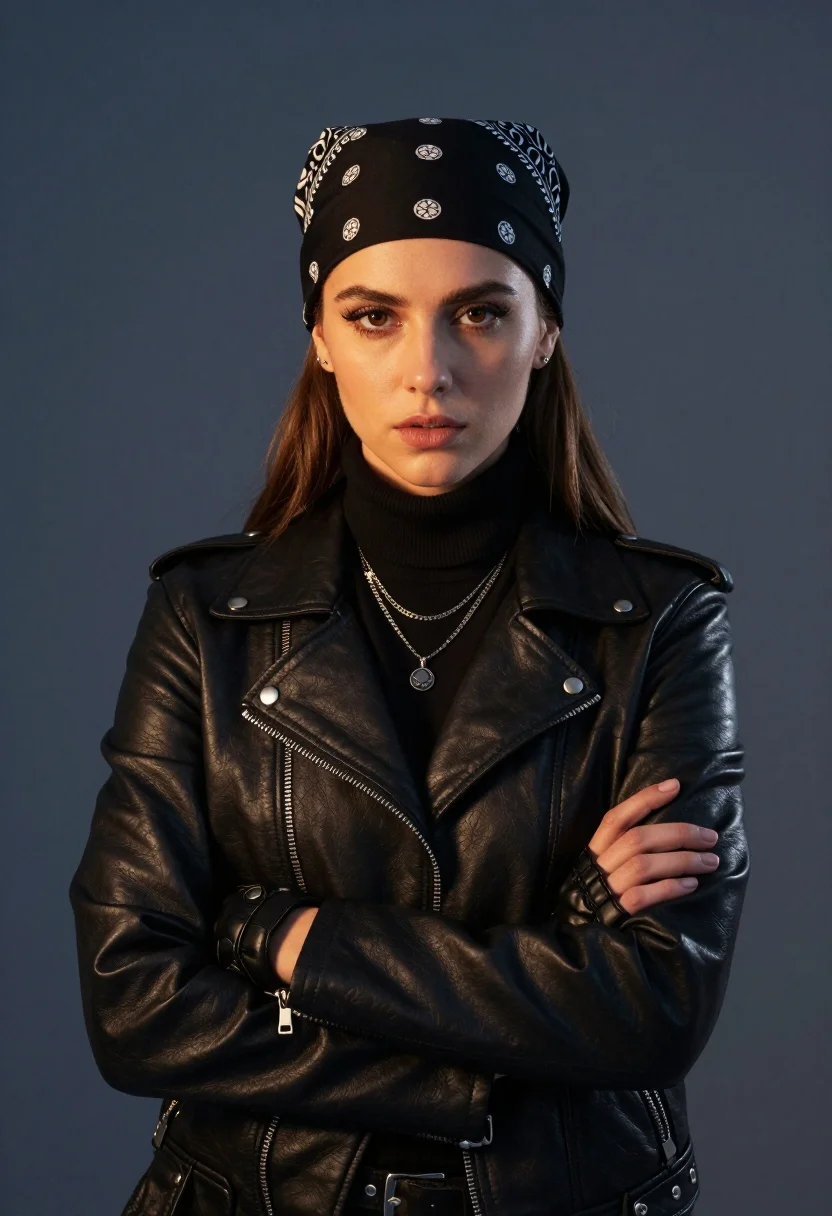
Medium close up of young woman in black leather jacket against dark
Prompt
A confident young woman with a serious expression stands against a solid dark blue-gray background.

Subject: A young woman with long brown hair partially tucked under a black bandana featuring white circular patterns and paisley designs on the sides, wearing subtle makeup with defined eyes and neutral lips.

Clothing: She wears a fitted black leather moto jacket with silver zippers and snap buttons over a black turtleneck sweater, accessorized with multiple layered necklaces including one with an X-shaped pendant and another with a round charm, along with small stud earrings and black leather gloves on her hands.

Action: Her arms are crossed tightly across her chest in a protective or defiant pose, with her gaze directed straight at the viewer.

Lighting: The scene is lit with dramatic warm highlights on the left side of her face and jacket, contrasting with cooler shadows on the right, creating a moody atmosphere with high contrast and soft directional light sources.

Camera: A medium close-up shot framed from the waist up, using a shallow depth of field that keeps the subject sharp while softly blurring the uniform background, suggesting a portrait lens.

Style Details: The image features realistic skin textures, detailed leather material rendering, cinematic color grading with warm and cool tones, and a polished studio photography aesthetic.
Description
This prompt is useful for creating edgy editorial portraits, character concept art for film stills, and high-contrast fashion lookbooks. The combination of 'dramatic warm highlights on the left side' against 'cooler shadows on the right' sculpts the face and jacket material, giving a palpable tension that supports the defiant pose while the 'shallow depth of field' isolates the subject from the uniform background.
Suggestions
- Change 'black bandana featuring white circular patterns and paisley designs' to 'solid black silk scarf' for less visual clutter.
- Swap 'dramatic warm highlights on the left side' for 'rim lighting from above' to change the mood.
- Adjust 'medium close-up shot framed from the waist up' to 'headshot' for a tighter focus.
Category
Tags
Brown HairBrunetteCasual WearFemaleMedium ShotPortrait ShotRealisticStudio
Date added
August 5, 2026
Added by
PromptDexter Team
Related Prompts
More prompts with similar categories and tags.
Smiling young woman in red satin dress against a plain white wall

Young woman in black graphic tshirt against white paneled wall

Glamorous woman posing in shimmering two piece outfit against green backdrop

Portrait of woman with red hair in navy blouse and green skirt
Confident woman in brown corset top and green skirt against gray background

Blonde woman in striped swimsuit seated on sofa indoors studio shot
Medium close up portrait of woman in ornate cream lehenga choli

Confident woman in embellished denim jumpsuit against a gray studio backdrop

Glamorous woman in black sequined gown against a white studio background
Young woman with brown hair posing by blue floral patterned wall