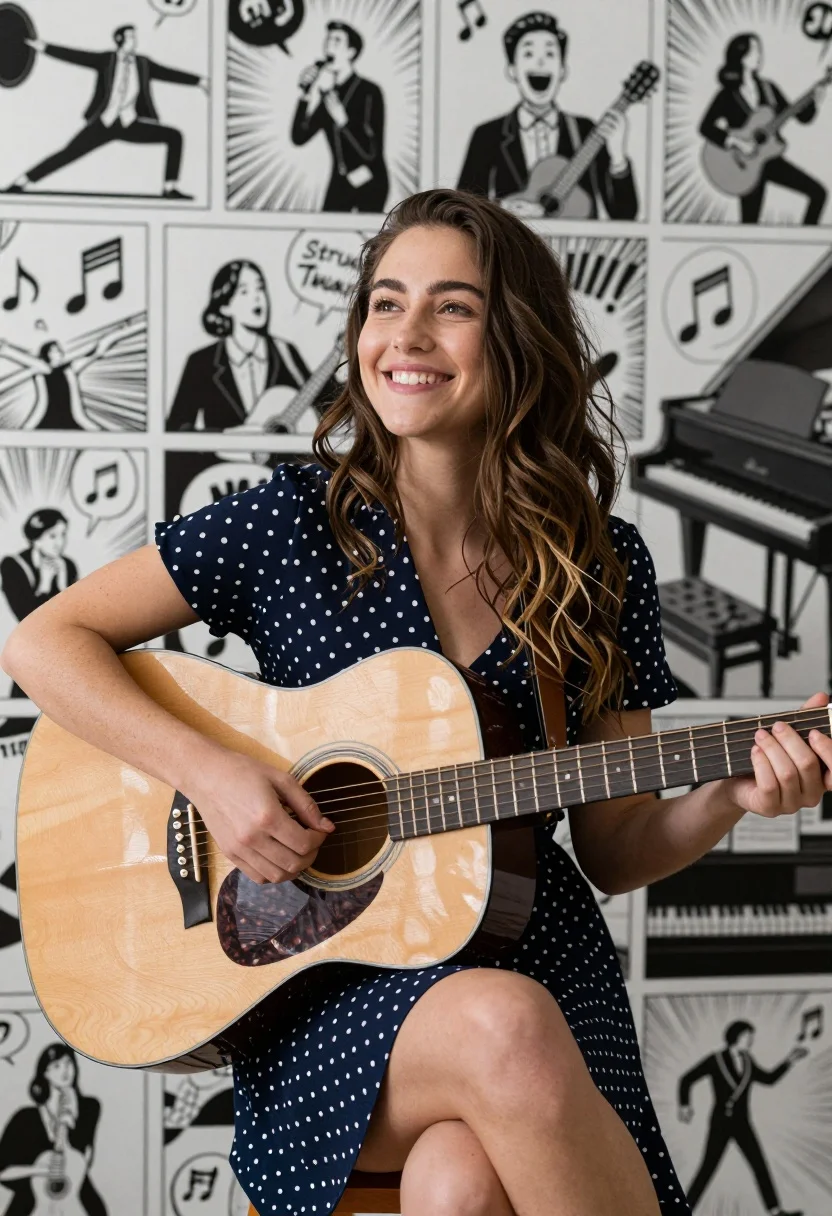
Smiling young woman with acoustic guitar against comic book panel collage background
Prompt
A smiling young woman with long wavy brown hair sits holding a large acoustic guitar in the foreground.

Subject: A happy young woman with long wavy brown hair and a warm smile.

Clothing: She wears a navy blue dress with white polka dots that has short sleeves and a V-neckline.

Action: She holds an acoustic guitar across her lap, strumming with her right hand and fretting chords with her left hand while looking slightly upward and to the side.

Environment: The background is a collage of black and white comic book panels depicting various musical scenarios including stretching, singing, playing guitar, and playing piano.

Camera: Medium shot framing the woman from the knees up with the comic panels filling the space behind her.

Lighting: Soft natural light illuminates the subject from the side creating gentle shadows on her face and highlighting the wood grain of the guitar.

Objects: A large acoustic guitar with a natural wood finish and dark pickguard is held by the subject.

Text/Graphics: Comic speech bubbles containing musical notes and sound effects such as Strum, Twang, and Clang are visible in the background panels.

Style Details: The image features a split aesthetic combining realistic photography of the central figure with high contrast black and white comic book art style for the background elements.
Description
This prompt is useful for creating album cover art, character concept sheets for indie bands, and themed editorial spreads blending realism with graphic design. The combination of 'soft natural light' on the subject against a high-contrast black and white comic book background ensures the woman remains grounded in photorealism while the stylized panels provide dynamic visual context that prevents the scene from feeling flat.
Suggestions
- Change 'navy blue dress with white polka dots' to 'gingham skirt' for a different pattern.
- Adjust 'Strum, Twang, and Clang' to more specific sound effects like 'BAM!' or 'WHOOSH!'.
- Modify 'Medium shot framing the woman from the knees up' to 'full body shot' to include her feet.
Category
Tags
Brown HairBrunetteFemaleMedium ShotOutdoorsRealistic
Date added
August 5, 2026
Added by
PromptDexter Team
Related Prompts
More prompts with similar categories and tags.

Smiling young woman walking on tropical beach path with palm trees

Smiling young woman in white ruffled dress between green topiary bushes

Smiling young woman in blue floral dress leaning against stone ledge

Smiling woman in red dress sitting in white macrame hanging chair

Woman with brown hair seated on red bench against weathered white wall

Smiling young woman in sweater vest within sunny autumn park setting

Young woman in olive saree leaning on railing outdoors during golden hour

Smiling young woman in maroon top standing outdoors with blurred background
Young woman playfully sticking tongue out holding dark hair outdoors in daylight

Young woman with brown hair against white wall wearing denim jeans