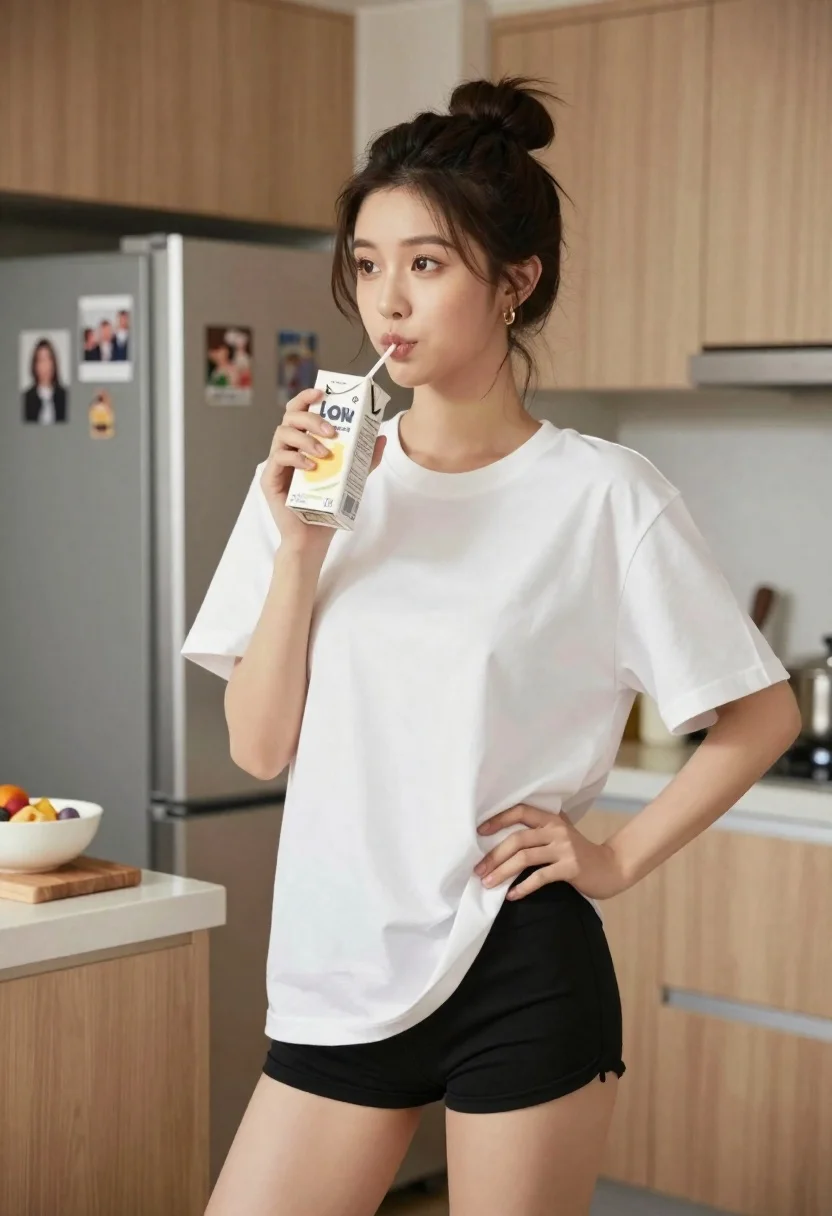
Young east asian woman in white tshirt sipping juice in modern kitchen
Prompt
A young woman with dark hair tied in a messy bun stands in a modern kitchen holding a juice carton to her lips with a straw.

Subject: A young East Asian woman with fair skin and a relaxed expression, looking slightly off-camera to the left. Her hair is dark brown and styled in a high, loose bun with wispy strands framing her face. She has subtle makeup and small gold hoop earrings.

Clothing: She wears an oversized white cotton t-shirt that hangs loosely on her frame, revealing her waistline, paired with tight black shorts.

Action: She holds a rectangular juice carton in her right hand, sipping through a straw while her left hand rests casually on her hip.

Environment: The setting is a bright, modern kitchen featuring light wood cabinetry, a stainless steel refrigerator with magnets and photos on the door in the background, and a countertop with a wooden cutting board holding a bowl of food.

Camera: Shot at eye level with a medium shot framing the subject from mid-thigh up, utilizing a shallow depth of field to keep the woman sharp while blurring the kitchen background softly.

Lighting: Soft, natural daylight illuminates the scene from the left, casting gentle highlights on her face and shirt while creating subtle shadows that add dimension without harshness.

Style Details: The image features a clean, high-definition aesthetic with smooth skin textures and realistic fabric rendering, evoking a lifestyle photography style.
Description
This prompt is useful for creating relatable lifestyle blog content, modern domestic advertisements, and casual portraiture featuring everyday routines. The combination of 'soft, natural daylight' and the 'oversized white cotton t-shirt' ensures that the scene feels lived-in rather than staged, while the 'shallow depth of field' keeps focus tightly on the subject's relaxed action against a detailed but blurred background.
Suggestions
- Change 'juice carton' to 'glass of fresh juice' for a more elegant feel.
- Swap 'light wood cabinetry' for 'matte black cabinets' for a bolder modern contrast.
- Adjust 'messy bun' to 'low ponytail' if you want a slightly more polished look.
Category
Tags
BrunetteCasual WearFair SkinFemaleIndoorsMedium ShotRealistic
Date added
June 19, 2026
Added by
PromptDexter Team
Related Prompts
More prompts with similar categories and tags.

Young woman with dark wavy hair sitting in modern bright indoor living
Young woman taking a mirror selfie in dimly lit modern interior room
Young woman in red velvet gown standing indoors against white wall
Young woman taking mirror selfie in black lingerie at bedroom
Young woman leaning over table in cafe with dessert and drink

Red haired woman in workshop with tools background
Young woman with dark hair seated by train window looking at camera
Young asian woman washing dishes at kitchen sink with bright daylight
Young woman in black slip dress standing by window in bright bedroom

Young woman with dark hair wearing black sweater indoors in bedroom setting