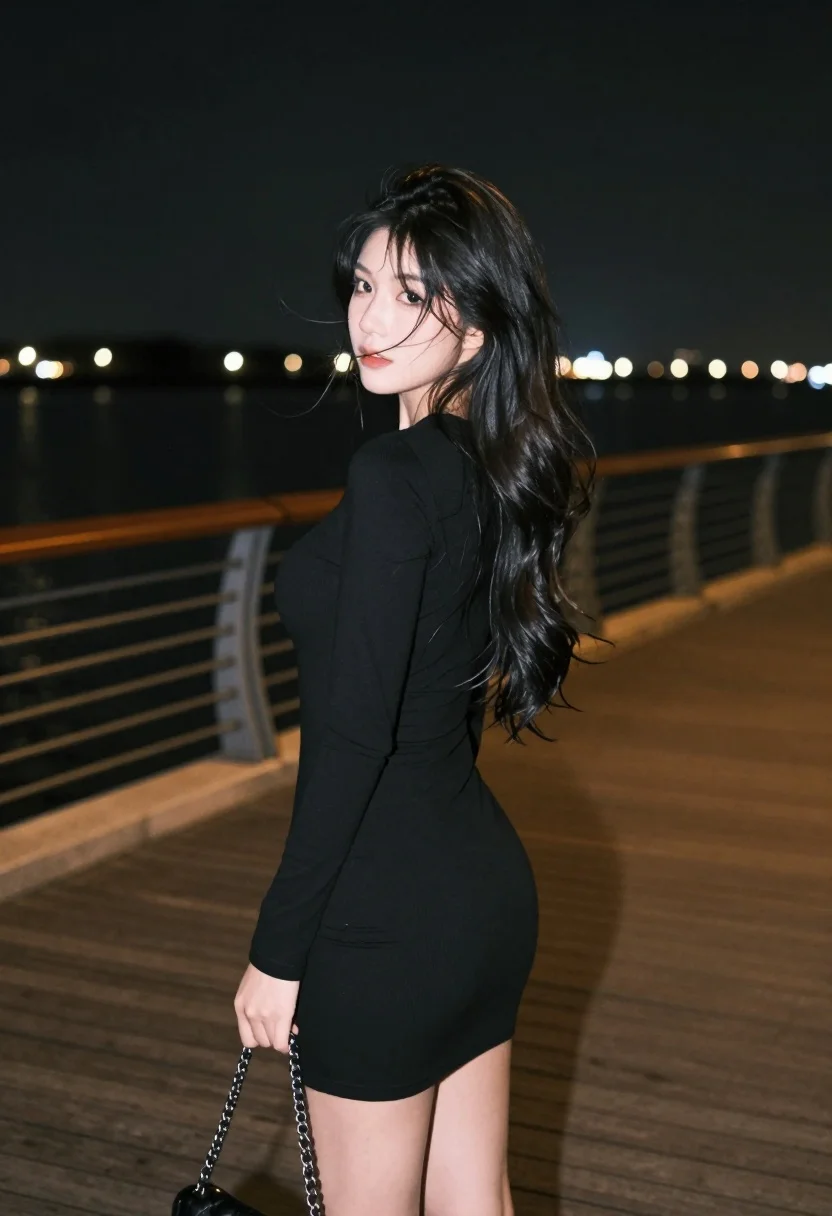
Young woman in black mini dress looking back over wooden boardwalk at
Prompt
A young woman stands in profile on a wooden boardwalk at night, looking back over her shoulder with a soft gaze.

Subject: A young woman with long dark hair that is slightly blowing across her face, featuring fair skin and subtle makeup with red lips.

Clothing: She wears a tight-fitting black long-sleeved mini dress made of a matte fabric.

Action: She stands in profile facing left but turns her head to look back at the camera, holding a black handbag by a silver chain strap in her right hand.

Environment: The setting is a wooden pier or boardwalk next to a body of water with city lights reflecting on the surface in the background under a dark night sky.

Camera: Shot from a medium-full length perspective with a shallow depth of field that blurs the distant background lights and keeps the subject sharp.

Lighting: Illuminated by ambient streetlights creating a moody, low-key atmosphere with soft highlights on her hair and face against the darkness.

Style Details: The image has a cinematic, film-like aesthetic with cool color tones and a slightly grainy texture typical of night photography.
Description
This prompt is useful for creating editorial fashion moodboards, cinematic character portraits, and moody streetwear lookbooks. The combination of 'ambient streetlights' providing soft highlights against the darkness, coupled with the 'shallow depth of field,' ensures the subject remains sharply focused while the distant city lights blur into bokeh, achieving a sophisticated, narrative quality.
Suggestions
- Change 'black handbag' to 'metallic silver clutch' for more contrast.
- Swap 'matte fabric' for 'wet-look vinyl' to enhance the nighttime sheen.
- Adjust 'cool color tones' to include hints of amber for warmer highlights.
Category
Tags
Back ViewFair SkinFemaleMedium ShotOutdoorsRealisticStreetwear
Date added
July 3, 2026
Added by
PromptDexter Team
Related Prompts
More prompts with similar categories and tags.

Blonde woman sitting on concrete ledge in urban alleyway sunlight

Woman in gold sequin slip dress looking over shoulder in forest

Woman in black velvet jacket on stone balcony against green hills

Woman in black dress by window overlooking ocean at golden hour

Young woman sitting among colorful clothes in minimalist studio setting
Woman in black gown looking over shoulder at urban event

Young woman in grey knit sweater sitting against red corrugated metal wall
Young woman in rust suede coat seated in weathered architectural corridor

Woman in deep red dress seated elegantly outdoors on grassy lawn

Blonde woman reading at a cafe table with roses