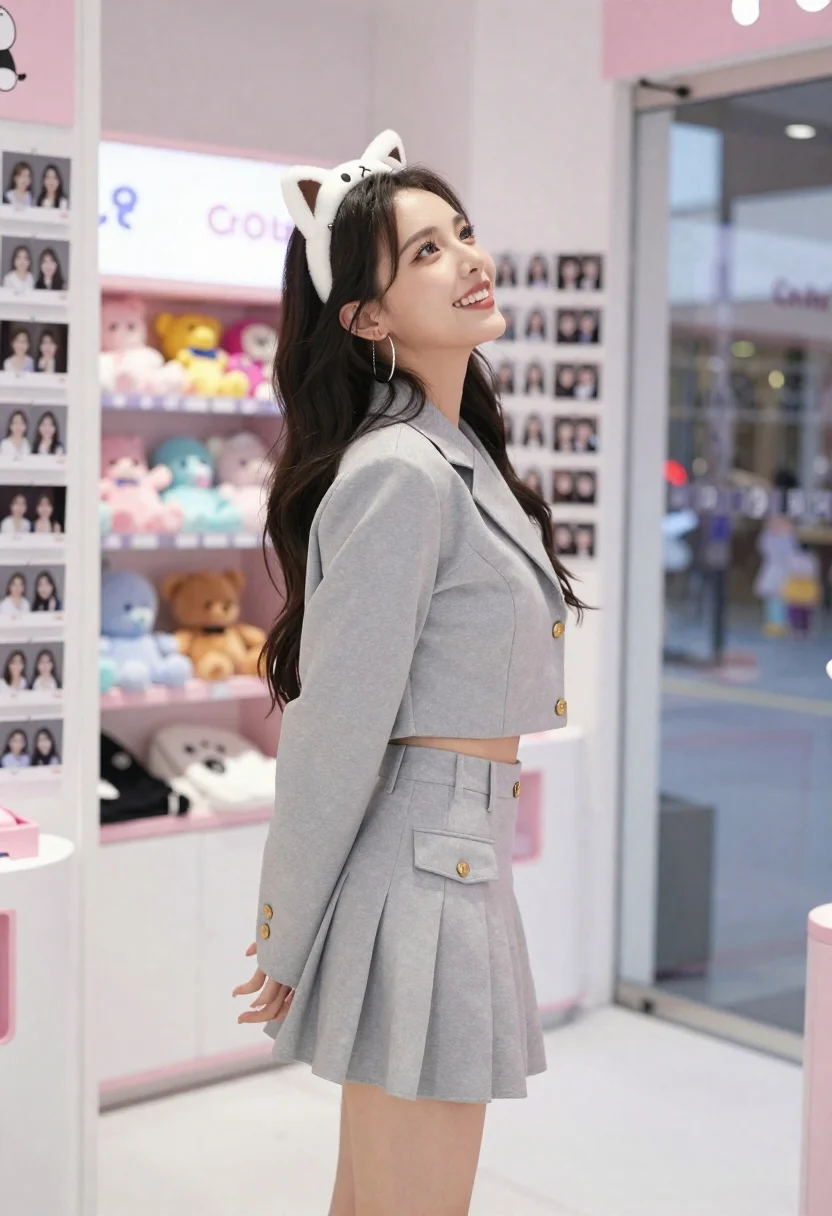
Young woman in grey outfit smiling inside decorated photo booth shop
Prompt
A young woman with long dark wavy hair stands smiling and looking upward inside a brightly decorated photo booth shop.

Subject: A young woman with long dark wavy hair, wearing a white cat-ear headband featuring a cartoon face, large silver hoop earrings, and a light grey two-piece outfit consisting of a cropped blazer jacket and a matching pleated mini skirt with a front pocket.

Clothing: She wears a light grey cropped blazer jacket with gold buttons and a matching high-waisted pleated mini skirt with a visible flap pocket on the hip.

Action: The woman is standing in profile facing right, looking upward with a bright smile, her left hand slightly extended near her side.

Environment: An indoor photo booth shop interior featuring white tiled floors, walls covered in hanging strips of printed photos and stickers, a pink display shelf with plush toys in the background, and a glass door or window to the right showing an outdoor street scene.

Camera: Medium shot capturing the subject from the thighs up, framed slightly from the side with a shallow depth of field that keeps the woman sharp while softly blurring the background details.

Lighting: Bright and even indoor lighting illuminating the subject clearly, creating soft highlights on her hair and clothing without harsh shadows.

Style Details: High-resolution commercial photography style with vibrant colors, clean composition, and a focus on fashion and lifestyle aesthetics.
Description
This prompt is useful for creating playful editorial content, modern portraiture for brand websites, and lifestyle blog features about pop culture settings. The combination of 'brightly decorated photo booth shop' elements with the 'light grey two-piece outfit' ensures the subject remains the focus while the background context adds narrative depth, preventing the image from feeling like a sterile studio shot.
Suggestions
- Change 'white cat-ear headband' to 'floral crown' for a softer feel.
- Adjust 'gold buttons' to 'matte silver' for a more modern look.
- Swap 'pink display shelf' for 'neon sign accents' to increase visual energy.
Category
Tags
BrunetteCasual WearFemaleMedium ShotPortrait ShotRealistic
Date added
June 19, 2026
Added by
PromptDexter Team
Related Prompts
More prompts with similar categories and tags.

Young woman in blue denim jacket posing against pale pink seamless background

Blonde woman in striped swimsuit seated on sofa indoors studio shot
Smiling young woman in red satin dress against a plain white wall

Young woman in black graphic tshirt against white paneled wall

Woman in dark brown slip dress outdoors against bright white sky

Glamorous woman posing in shimmering two piece outfit against green backdrop
Woman in sheer crystal gown looking over shoulder at event backdrop
Young woman in red velvet outfit against white paneled interior wall
Confident woman in pinstriped suit jacket against solid teal background
Poised woman in black fur stole against a plain light grey studio