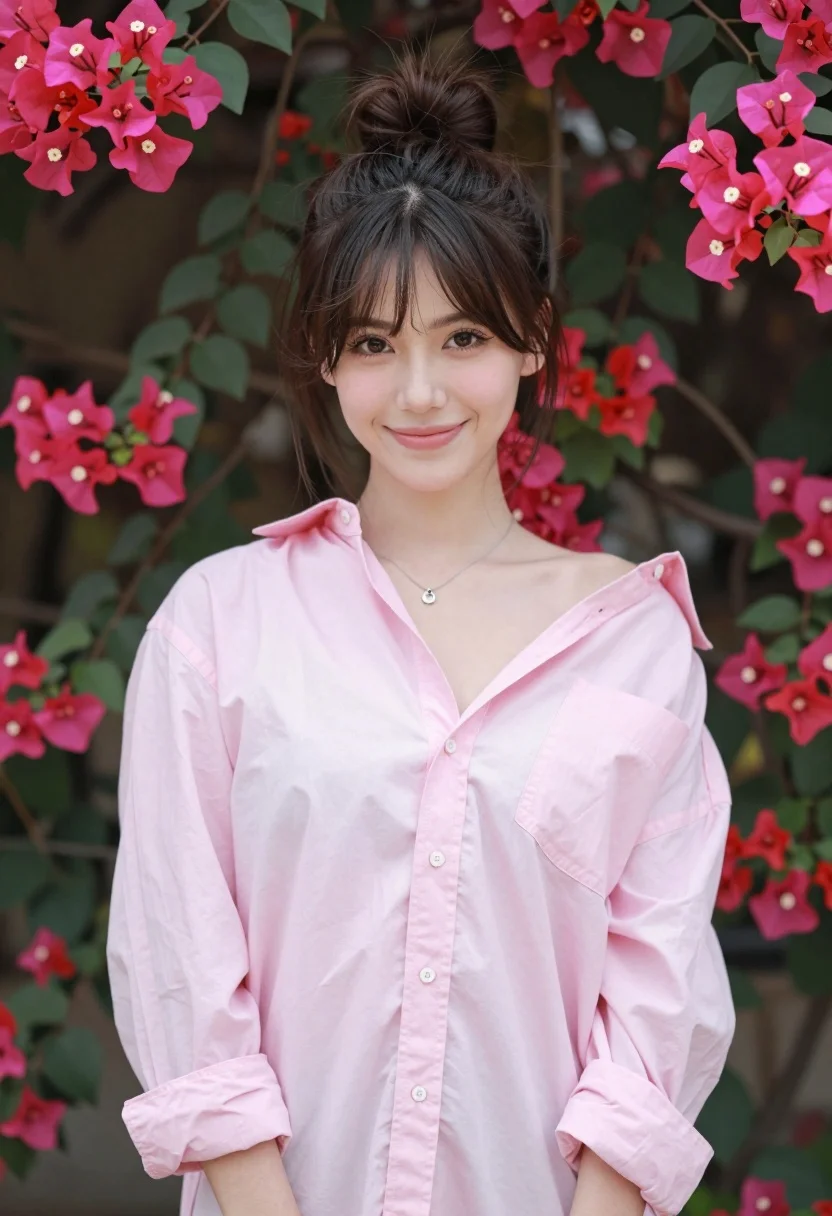
Young woman in pink shirt against vibrant bougainvillea flowers portrait
Prompt
A young woman stands in a soft-focus portrait against a lush wall of vibrant pink bougainvillea flowers.

Subject: A young woman with dark brown hair styled in a high messy bun, featuring loose wisps framing her face and prominent sideburns. She has fair skin, defined eyebrows, and is looking directly at the camera with a gentle, closed-mouth smile.

Clothing: She wears an oversized, light pink button-down shirt with long sleeves that are slightly pushed up, worn off one shoulder to reveal her collarbone. A delicate silver necklace with a small pendant rests on her chest.

Action: She stands facing forward in a relaxed pose with her hands likely at her sides or behind her back, maintaining steady eye contact with the viewer.

Environment: The background is filled with dense green foliage and clusters of bright magenta bougainvillea flowers that create a colorful, textured backdrop.

Lighting: Soft, natural daylight illuminates the scene evenly, creating gentle highlights on her face and shirt without harsh shadows, resulting in a warm and inviting mood.

Camera: A medium close-up shot with a shallow depth of field that keeps the subject sharp while blurring the floral background into soft bokeh.

Style Details: The image features a clean, high-quality photographic aesthetic with natural color grading and a focus on soft textures.
Description
This prompt is useful for creating editorial beauty portraits, lifestyle catalog imagery, and romantic fine art prints. The combination of 'soft, natural daylight' and the 'shallow depth of field' ensures the subject remains tack-sharp while allowing the 'vibrant pink bougainvillea flowers' to dissolve into a pleasing bokeh, which prevents the background from competing with the delicate details of her face and shirt.
Suggestions
- Change 'light pink button-down shirt' to 'cream silk blouse' for more luxurious texture.
- Swap 'bright magenta bougainvillea flowers' for 'deep purple wisteria' for color variation.
- Adjust 'medium close-up shot' to 'headshot' to emphasize the face and hair.
Category
Tags
Brown HairBrunetteCasual WearFair SkinFemaleMedium ShotOutdoorsPortrait ShotRealistic
Date added
August 5, 2026
Added by
PromptDexter Team
Related Prompts
More prompts with similar categories and tags.

Young woman leaning against white wall with beige handbag under bright sunlight

Smiling young woman in floral mini dress against soft textured beige wall

Young woman in black and white patterned outfit on urban rooftop

Young woman in blue denim jacket posing against pale pink seamless background

Young woman in black graphic tshirt against white paneled wall
Woman in dark brown slip dress outdoors against bright white sky

Glamorous woman posing in shimmering two piece outfit against green backdrop
Woman in red halter dress sitting on stones against textured rock wall
Woman in fuchsia saree posing against textured beige stone wall

Woman with brown hair in white top and black skirt indoors