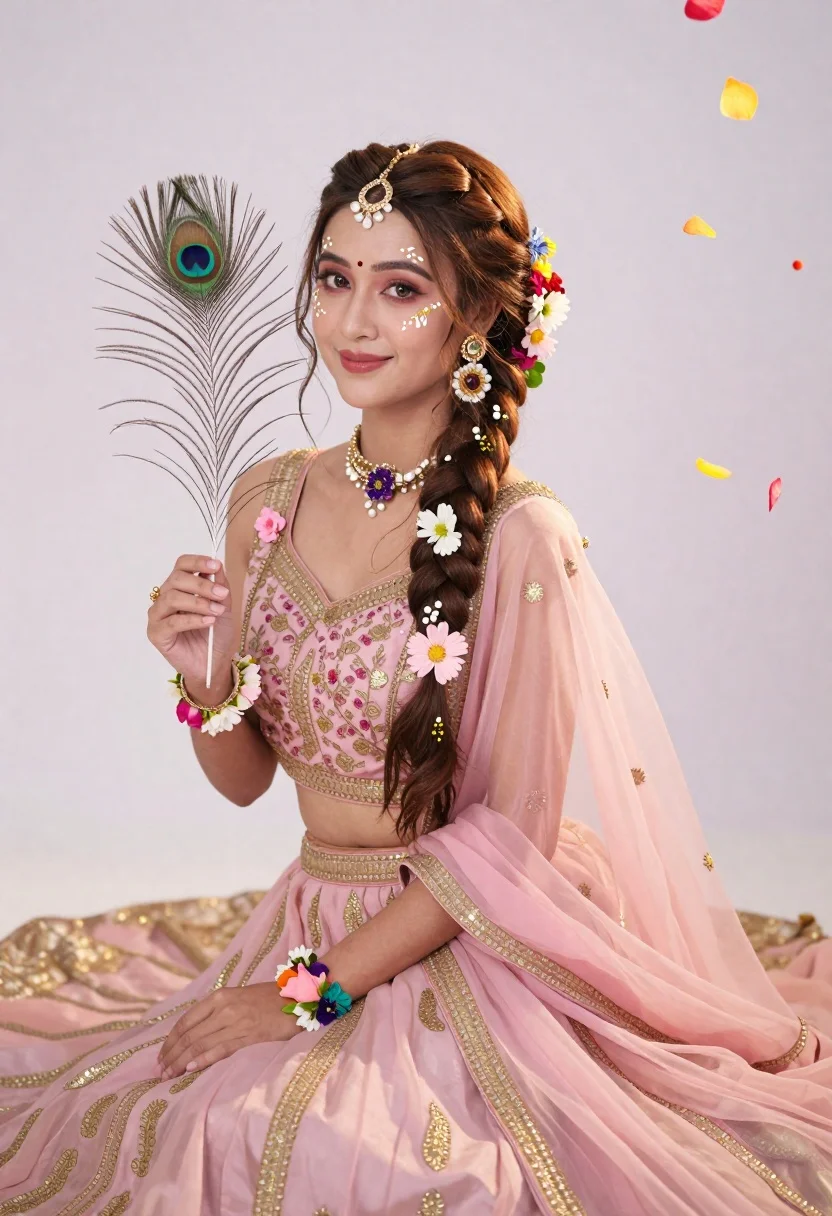
Young woman in pink traditional gown with gold embroidery and floral jewelry
Prompt
A young woman sits gracefully in a soft pink traditional gown adorned with gold embroidery and floral accents.

Subject: A fair-skinned woman with long brown hair styled in an intricate braid decorated with colorful flowers, featuring delicate white face paint with gold swirls around her eyes and forehead, along with a red bindi on her forehead and a jeweled headpiece.

Clothing: She wears a sheer pink lehenga or gown with gold patterns, a matching dupatta draped over her shoulder, and floral jewelry including a necklace, wrist cuffs, and earrings made of small flowers.

Action: She holds a peacock feather in her right hand while looking directly at the camera with a gentle smile.

Environment: The background is a plain white studio setting with floating colorful flower petals drifting to the right side of the frame.

Camera: Shot from a medium close-up angle with soft focus on the background, emphasizing the subject’s face and attire.

Lighting: Soft, diffused lighting creates a dreamy, ethereal mood with gentle shadows and highlights that enhance the pastel tones.

Style Details: The image has a romantic, fairy-tale aesthetic with high detail, smooth skin texture, and a soft color palette dominated by pinks, golds, and pastels.
Description
This prompt is useful for creating cultural portraiture, bridal lookbooks, and editorial fantasy spreads requiring an ethereal feel. The combination of 'soft, diffused lighting' with the 'plain white studio setting' ensures that the intricate details of the 'gold embroidery' and the subject’s face remain visible without harsh shadows, perfectly supporting a romantic, fairy-tale aesthetic.
Suggestions
- Change 'soft pink traditional gown' to 'deep magenta lehenga' for more contrast.
- Add 'bokeh effect' to the background description for greater depth.
- Swap 'peacock feather' for 'jasmine garland' to complement the floral jewelry.
Category
Tags
Brown HairFair SkinFemaleMedium ShotPortrait ShotRealisticStudioTraditional Wear
Date added
June 21, 2026
Added by
PromptDexter Team
Related Prompts
More prompts with similar categories and tags.

Young woman in blue denim jacket posing against pale pink seamless background

Young woman in black graphic tshirt against white paneled wall

Portrait of woman in elaborate red feathered gown against vivid blue background

Blonde woman in cream sweater sitting on beige couch

Glamorous woman posing in shimmering two piece outfit against green backdrop
Medium close up portrait of woman with brown wavy hair in magenta
Fair skinned woman in black blazer against white studio wall
Close up portrait of woman in champagne gown with brown hair
