
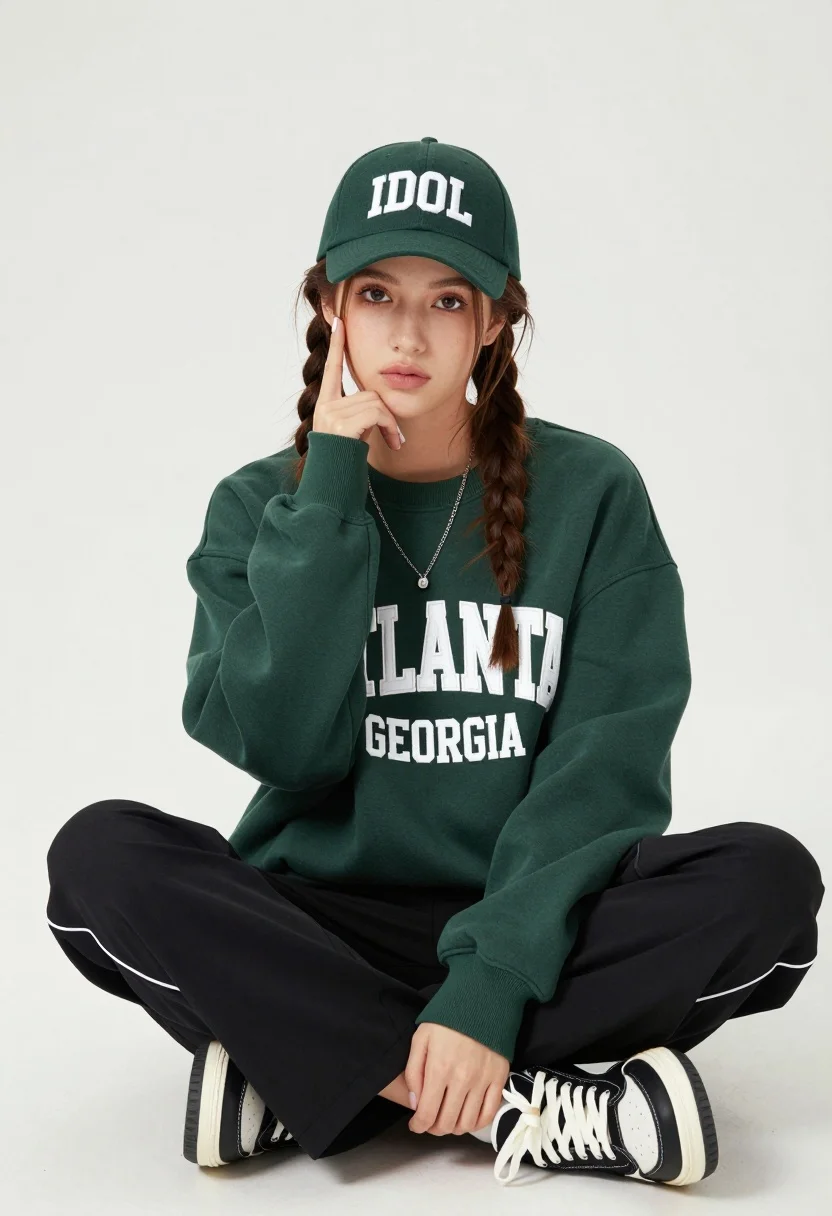
Young woman with braids sitting cross legged in green sweatshirt studio portrait
Prompt
A young woman with braided hair sits cross-legged on a white floor, wearing a green baseball cap and matching oversized sweatshirt.

Subject: A young woman with fair skin and long brown hair styled in two side braids, featuring a soft gaze directed at the camera.

Clothing: She wears a dark green crewneck sweatshirt with large white collegiate lettering reading "ATLANTA GEORGIA," black track pants with white piping down the sides, and black and white high-top sneakers. She accessorizes with a dark green baseball cap displaying the word "IDOL" in white letters and layered silver necklaces.

Action: She is seated on the ground with her legs crossed, resting her right cheek against her hand while her left hand rests near her knee.

Environment: A plain, seamless white studio background with no other objects or distractions.

Camera: Medium shot capturing the subject from the knees up, utilizing a soft depth of field to keep the focus sharp on the face and upper body.

Lighting: Soft, diffused studio lighting illuminates the scene evenly from the front, creating gentle shadows and highlighting the texture of the clothing without harsh contrast.

Style Details: Clean commercial fashion photography style with high resolution and natural color grading.
Description
This prompt is useful for creating casual lifestyle brand campaigns, collegiate merchandise advertising, and intimate portrait sessions requiring a clean backdrop. The combination of 'soft, diffused studio lighting' and the 'plain, seamless white studio background' ensures that all visual attention remains on the subject's expression and the specific details of the 'dark green crewneck sweatshirt,' preventing any distracting environmental elements from competing with the merchandise focus.
Suggestions
- Change 'green baseball cap' to a different color like 'navy blue' for contrast.
- Swap 'collegiate lettering reading "ATLANTA GEORGIA"' for a more abstract graphic design element.
- Adjust 'soft depth of field' to 'shallow depth of field' for more background separation.
Category
Tags
Brown HairCasual WearFair SkinFemaleIndoorsMedium ShotPortrait ShotRealisticStudio
Date added
August 5, 2026
Added by
PromptDexter Team
Related Prompts
More prompts with similar categories and tags.

Blonde woman in cream sweater sitting on beige couch

Smiling young woman in pink dress seated indoors with glowing backlight

Young woman in cream blouse leaning against rustic wood

Young woman in white lace dress seated against soft floral backdrop

Young woman in blue denim jacket posing against pale pink seamless background

Young woman seated on grey sofa against pink wall fashion portrait

Smiling woman in floral kurta dress indoors with sheer dupatta drape

Blonde woman in striped swimsuit seated on sofa indoors studio shot
Young woman in navy jumpsuit posing indoors with soft expression

Glamorous woman posing in shimmering two piece outfit against green backdrop
