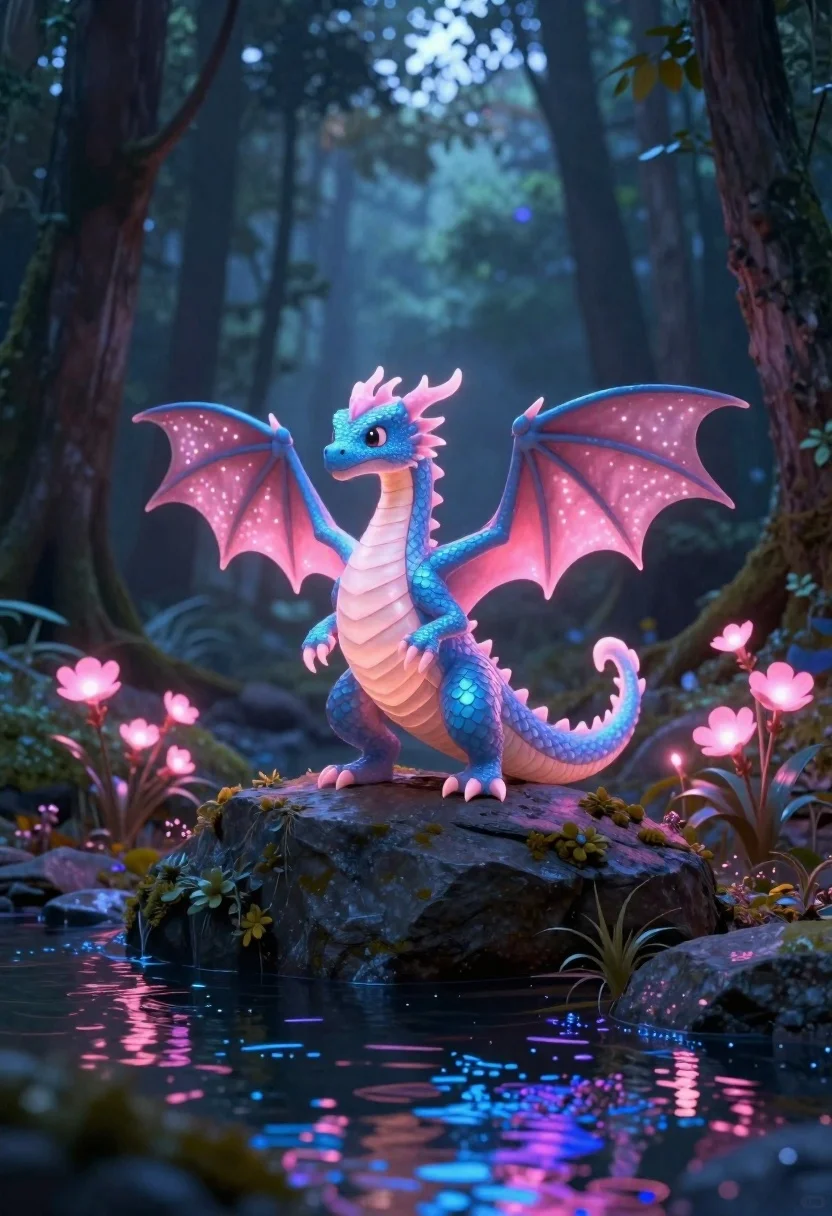
Glowing dragon on dark rock in a magical forest
Prompt
Subject: a small glowing dragon with blue and pink scales standing on top of a dark rock formation in a forest

Action: the dragon stands alertly looking to its left, wings partially spread behind it like sails filled with light particles

Environment: tall thin tree trunks surround the scene forming an enclosed woodland space, glowing pink flowers grow on both sides of the rock and along the stream bed below which flows through the center bottom of frame reflecting magical blue and purple hues from above

Camera: medium shot capturing full body height up to head level emphasizing scale against surrounding trees while keeping focus centered within depth-of-field blur fading into misty distance beyond immediate foreground elements like flowing water surface shimmering with reflected colors originating primarily from dragon's own luminescence rather than external light sources such as moonlight or torches illuminating entire scene uniformly

Lighting: primary illumination comes directly off body itself casting soft diffuse glow onto nearby surfaces including rock beneath feet and surrounding foliage, creating subtle gradients transitioning smoothly between deep shadows near tree trunks and brighter highlights where emitted radiance reaches maximum intensity around wingspan edges

Other Subjects: none present besides main character.
Description
This prompt is useful for creating fantasy concept art, video game environment key visuals, and book cover illustrations depicting magical encounters. The combination of 'primary illumination comes directly off body itself' ensures the dragon remains the sole light source, preventing flat lighting that would otherwise obscure the intricate details of its blue and pink scales against the deep shadows near tree trunks.
Suggestions
- Change 'blue and pink scales' to 'iridescent gold and cyan scales' for a different color palette.
- Add 'volumetric fog' to enhance the misty distance beyond immediate foreground elements.
- Modify 'dark rock formation' to 'obsidian crystal spire' for more dramatic grounding.
Category
Tags
AnimalsCreatureForestFull BodyMedium ShotNature
Date added
June 19, 2026
Added by
PromptDexter Team
Related Prompts
More prompts with similar categories and tags.

Three disney characters on a tropical grassy rock

Translucent cosmic teddy bear in outer space

Cartoon owl wearing a hat in autumn forest
Two reptilian aliens in a worn spacecraft cockpit

Muscular turtle in combat gear on wet city pavement

Cat surfing on yellow board in tropical ocean waves

Blue unicorn resting on bed in sunlit bedroom

Woman standing barefoot in dry autumn field at golden hour