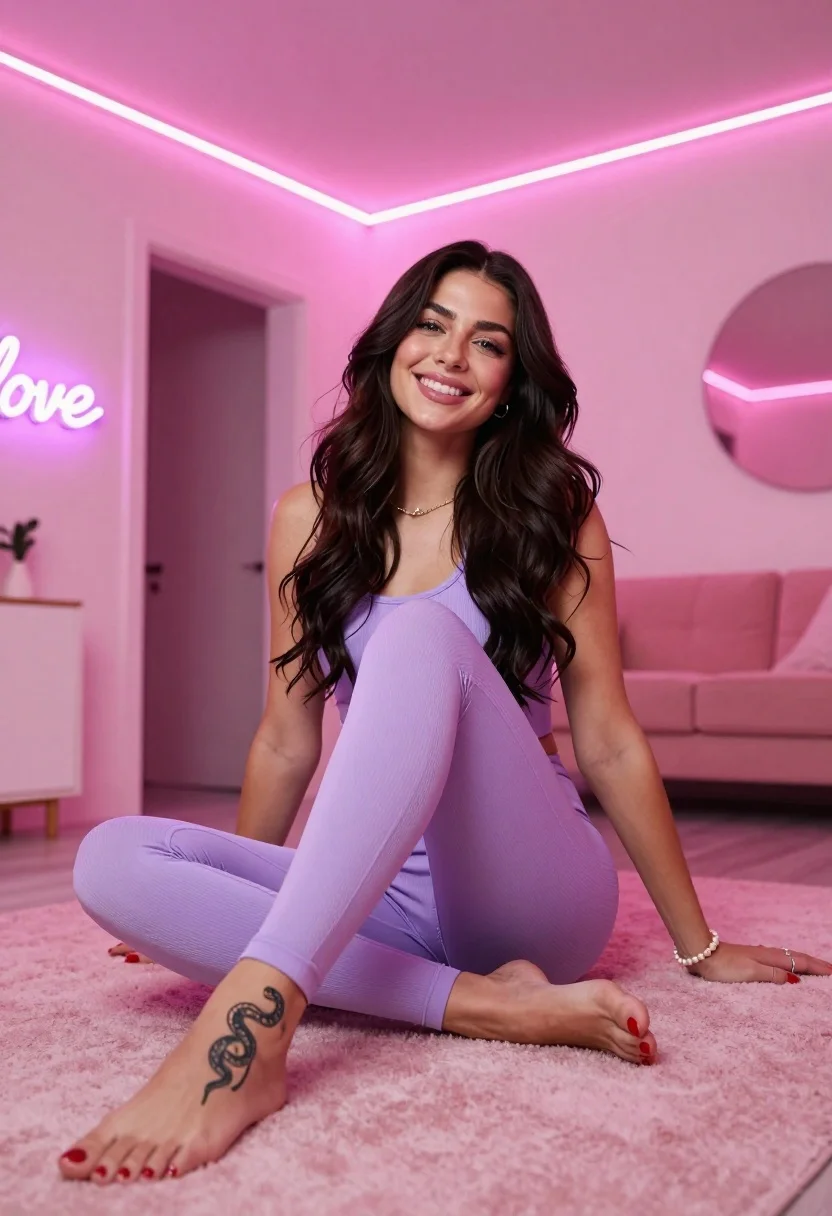
Smiling woman in purple athletic wear sitting on pink surface indoors
Prompt
A smiling woman with long wavy dark hair sits cross-legged on a soft pink textured surface in a modern room.

Subject: A young woman with fair skin and long, dark brown wavy hair that falls over her shoulders. She has blue eyes and is looking directly at the camera with a warm smile. A distinct snake tattoo is visible on the top of her left foot.

Clothing: She wears a matching light purple ribbed athletic set consisting of a tank top and leggings. She accessorizes with a delicate gold chain necklace, a silver ring on her right hand, a pearl bracelet on her left wrist, and bright red nail polish.

Action: She is seated in a relaxed pose with her legs crossed and feet extended forward. Her hands rest gently on the surface near her knees.

Environment: The setting appears to be a modern interior space with soft pink walls. In the background, there is a doorway leading to another room and a neon sign that reads "love" in purple light.

Lighting: The scene is illuminated by bright pink LED strip lights running along the ceiling beams, casting a strong pink glow over the subject and creating a vibrant, colorful atmosphere.

Camera: The shot is taken from a low angle looking slightly upward at the seated subject, emphasizing her presence against the ceiling lights.

Style Details: The image features a high-fashion aesthetic with a focus on pastel color grading, soft textures, and a clean, polished digital rendering quality.
Description
This prompt is useful for creating vibrant sportswear advertisements, modern lifestyle editorial spreads, and themed pop art fashion shoots. The combination of 'bright pink LED strip lights' casting a strong glow against the 'soft pink textured surface' establishes an artificial, high-energy mood that complements athletic wear while using the low angle to make the subject appear monumental within the controlled environment.
Suggestions
- Change 'light purple ribbed athletic set' to 'deep violet seamless athleisure' for more contrast.
- Swap 'neon sign that reads "love" in purple light' for a 'minimalist geometric pattern on the wall' to reduce visual clutter.
- Adjust 'low angle looking slightly upward' to 'eye-level medium shot' for a more intimate portrait feel.
Category
Tags
Brown HairBrunetteCasual WearFair SkinFemaleFull BodyIndoorsLow AnglePortrait ShotRealistic
Date added
July 12, 2026
Added by
PromptDexter Team
Related Prompts
More prompts with similar categories and tags.

Woman in rust dress looking back over shoulder on stone staircase at

Young woman leaning against white wall with beige handbag under bright sunlight

Blonde woman in maroon fringed dress standing in white arched hallway

Two women in red mini dresses posing indoors at an opulent setting

Confident woman in embellished denim jumpsuit against a gray studio backdrop

Young woman in black graphic tshirt against white paneled wall
Full length portrait of woman in black traditional outfit indoors

Glamorous woman posing in shimmering two piece outfit against green backdrop

Young woman with braided hair in misty woodland setting
Young woman leaning against ornate wooden door with green foliage background
