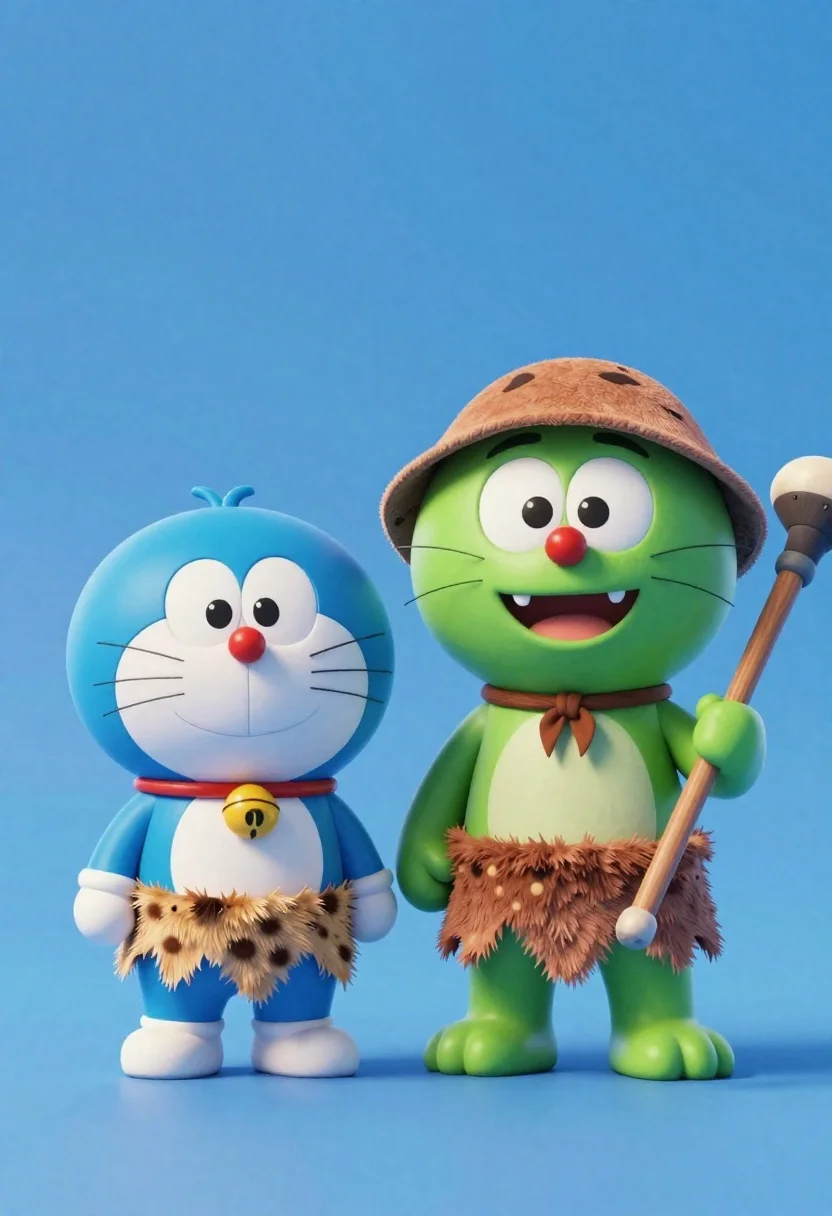
Two friendly cartoon cats standing side by side against a blue background
Prompt
Two friendly cartoon cats standing side by side against a solid blue background.

Subject: A fluffy blue cat on the left and a larger green cat on the right, both with wide eyes, red noses, and small fangs.

Clothing: Both characters wear primitive loincloths made of spotted brown fur with jagged edges; the green cat wears a simple brown cap.

Action: The blue cat stands with hands at its sides smiling gently, while the green cat holds a wooden club over its shoulder and smiles broadly.

Environment: A minimalist studio setting with a seamless gradient blue background that transitions from darker at the top to lighter near the bottom.

Camera: Eye-level medium shot capturing full bodies with soft focus on the background to emphasize the characters.

Lighting: Soft, even lighting from the front creating gentle shadows under the feet and chin without harsh contrast.

Style Details: High-quality 3D animation style resembling modern CGI character design with smooth textures and vibrant colors.
Description
This prompt is useful for creating children's book illustrations, mascot designs for pet brands, and whimsical animated shorts. The combination of 'fluffy blue cat' and 'green cat' against a 'seamless gradient blue background' establishes a clear, non-distracting stage that keeps the focus entirely on the characters' expressive features, while 'soft, even lighting from the front' ensures all details like the 'jagged edges' of the loincloths remain visible without harsh shadows.
Suggestions
- Change 'fluffy blue cat' to 'calico cartoon cat' for more pattern variation.
- Swap 'wooden club' for 'large colorful flower' to soften the action.
- Adjust 'seamless gradient blue background' to 'pastel sky blue backdrop' for a different mood.
Category
Tags
3dAnimalFull BodyMedium ShotOutdoorsStudio
Date added
June 23, 2026
Added by
PromptDexter Team
Related Prompts
More prompts with similar categories and tags.
Cheerful plush toy boy holding a teal walkie talkie on a grassy

Three animated characters standing together against a solid blue background

Full body studio shot of woman and anthropomorphic fox character
Cute round 3d animated bee character floating in midair against solid yellow

Full body studio portrait of woman with two animated animal friends
3d render of cute tiger cub with bicycle in studio

Woman in police uniform stands with fox wearing shirt against white studio
Young woman with brown hair and golden retriever under pine tree