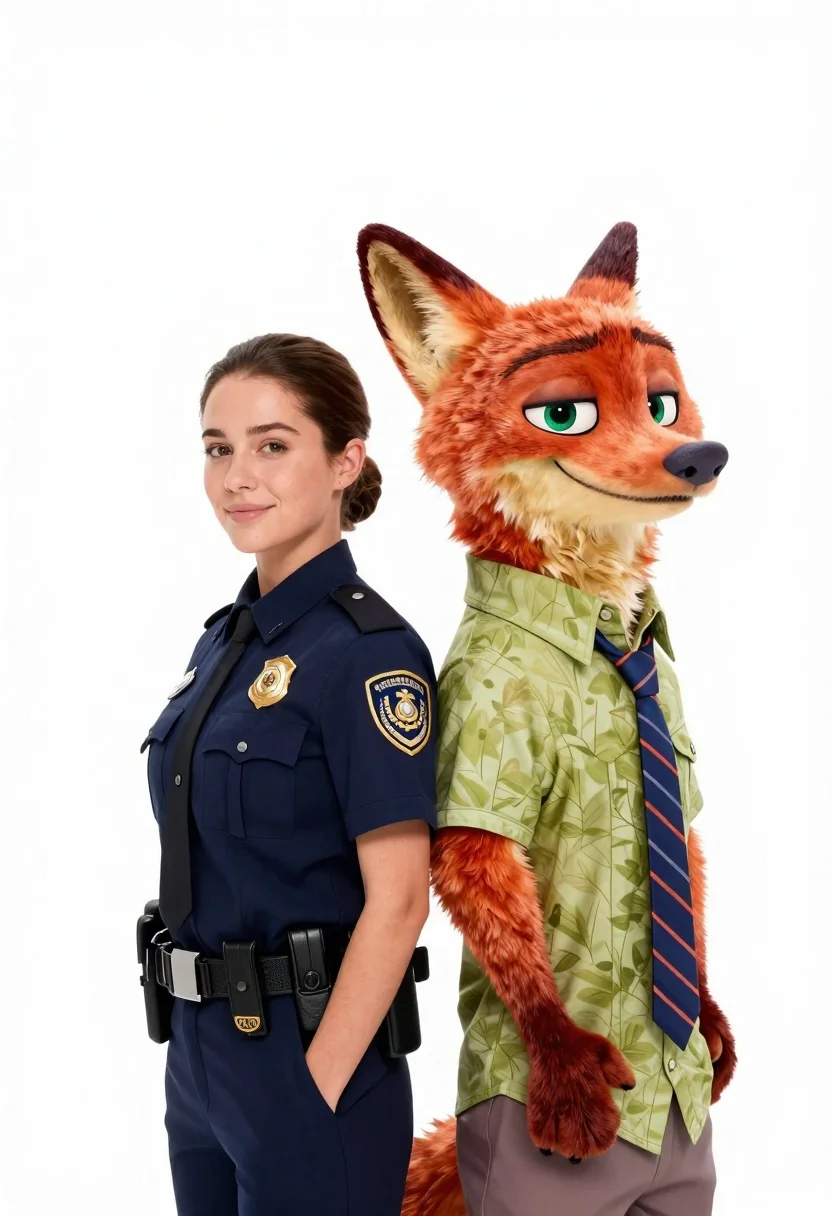
Woman in police uniform stands with fox wearing shirt against white studio
Prompt
A woman in a police uniform stands back-to-back with an anthropomorphic fox wearing a shirt and tie against a plain white background.

Subject: A young woman with brown hair pulled back into a bun and a large orange fox with green eyes and a black nose standing side by side.

Clothing: The woman wears a dark navy blue short-sleeved police uniform shirt featuring a gold badge on the chest and an epaulette on the shoulder, while the fox wears a light green short-sleeved button-up shirt with a subtle leaf pattern and a blue and orange striped tie.

Action: Both subjects stand in profile facing opposite directions but looking forward at the camera with gentle smiles.

Environment: A seamless white studio background with no other environmental details visible.

Camera: Medium shot capturing both subjects from the waist up, utilizing a clean composition that isolates the figures against the white backdrop.

Lighting: Bright and even studio lighting illuminating the subjects clearly with soft shadows and high contrast between the dark uniform and the bright background.

Style Details: Photorealistic rendering with high fidelity textures on the fur and fabric, resembling a professional character portrait or promotional still.
Description
This prompt is useful for creating character concept art, mascot-themed advertising visuals, and stylized narrative illustrations. The combination of 'photorealistic rendering' with 'bright and even studio lighting' ensures that the detailed textures on both the fur and fabric are visible without harsh shadows, which is necessary for clear promotional stills.
Suggestions
- Change 'dark navy blue' to 'forest green' for a different uniform color.
- Modify the fox's tie pattern from 'blue and orange striped' to 'tartan plaid'.
- Replace 'medium shot' with 'full body' to show more of the interaction.
Category
Tags
3dAnimalsBrown HairFemaleFull BodyMedium ShotRealisticStudio
Date added
June 19, 2026
Added by
PromptDexter Team
Related Prompts
More prompts with similar categories and tags.

Full body studio portrait of woman with two animated animal friends

Smiling woman next to pink panther mascot in a seamless pastel studio

Smiling young woman posing with large blue robot cat mascot on solid

Three animated characters standing together against a solid blue background

Woman in pink suit presenting ring box to large red reindeer mascot
Full body portrait of woman with pink sweater next to animated bird
Young man smiling selfie surrounded by colorful angry birds characters
Young boy in yellow sweater hugged by blue robotic cat on blue
Handsome man in suede shirt sitting at desk in art studio

Full body studio shot of woman standing between large mario and luigi