
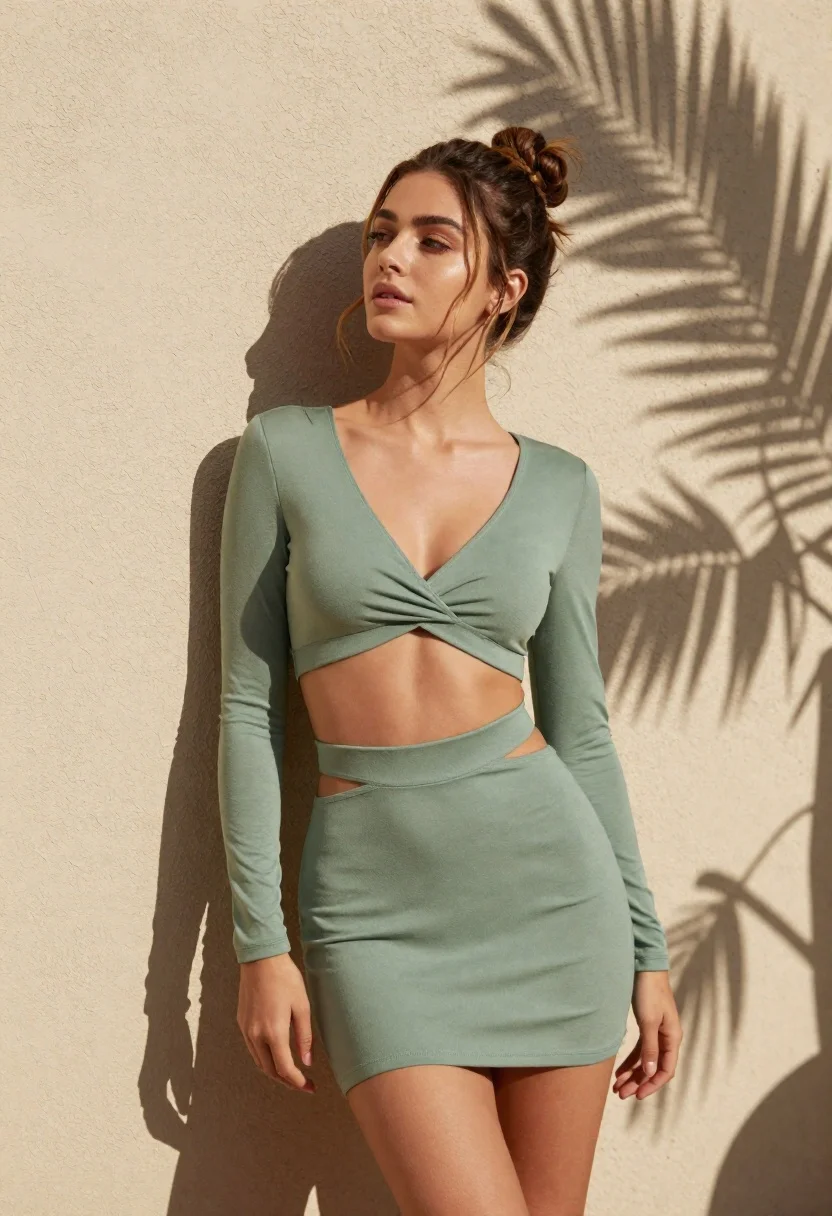
Young woman in sage green outfit leaning against textured wall in sunlight
Prompt
A young woman with a high bun hairstyle leans back against a textured beige wall, bathed in bright sunlight.

Subject: A beautiful young woman with brown hair styled in a messy high bun and loose tendrils framing her face. She has fair skin, defined eyebrows, and is looking slightly upward with a serene expression.

Clothing: She wears a sage green two-piece outfit consisting of a long-sleeved crop top with a deep V-neck twist at the bust and a matching high-waisted mini skirt featuring thin strappy cutouts at the waistline. The fabric appears to be a soft, stretchy knit material.

Action: She is leaning back against the wall in a relaxed pose, with her head tilted slightly up towards the light. Her left hand rests gently near her hip, and her right arm hangs by her side.

Environment: The background is a rough-textured beige stucco or concrete wall. Distinct shadows of palm fronds are cast across the wall and onto the woman's body, indicating an outdoor setting with nearby vegetation.

Lighting: Strong, direct sunlight creates high contrast, casting deep shadows from the leaves while highlighting the contours of her face and torso. The light source is coming from above and slightly to the side.

Camera: The shot is a medium full-body view taken at eye level, capturing the subject from the thighs up against the wall.

Style Details: High-resolution photography with sharp focus on the subject, emphasizing skin texture and fabric folds, rendered in a realistic and polished aesthetic.
Description
This prompt is useful for creating lifestyle editorial spreads, resort wear lookbooks, and natural portrait galleries. The combination of 'strong, direct sunlight' casting distinct shadows from palm fronds across the 'rough-textured beige stucco or concrete wall' grounds the subject in a specific, sun-drenched environment, preventing the image from looking like it was shot against a flat backdrop.
Suggestions
- Change 'sage green two-piece outfit' to 'terracotta knit set' for warmer tones.
- Add 'golden hour backlighting' to soften the high contrast shadows.
- Modify 'messy high bun' to 'braided crown' for a more structured look.
Category
Tags
Brown HairFair SkinFemaleFull BodyMedium ShotOutdoorsPortrait ShotRealistic
Date added
June 21, 2026
Added by
PromptDexter Team
Related Prompts
More prompts with similar categories and tags.
Young woman in white lace outfit sitting on stone ledge in garden

Young woman in green jacket holding plush toy at festive carousel
Indian woman in pink and peach traditional dress in sunlit courtyard

Young woman leaning against white wall with beige handbag under bright sunlight

Young woman in grey top and white skirt by water at dusk

Woman standing barefoot in dry autumn field at golden hour

Portrait of woman in elaborate red feathered gown against vivid blue background
Young woman in pink lace gown standing in misty wildflower field
