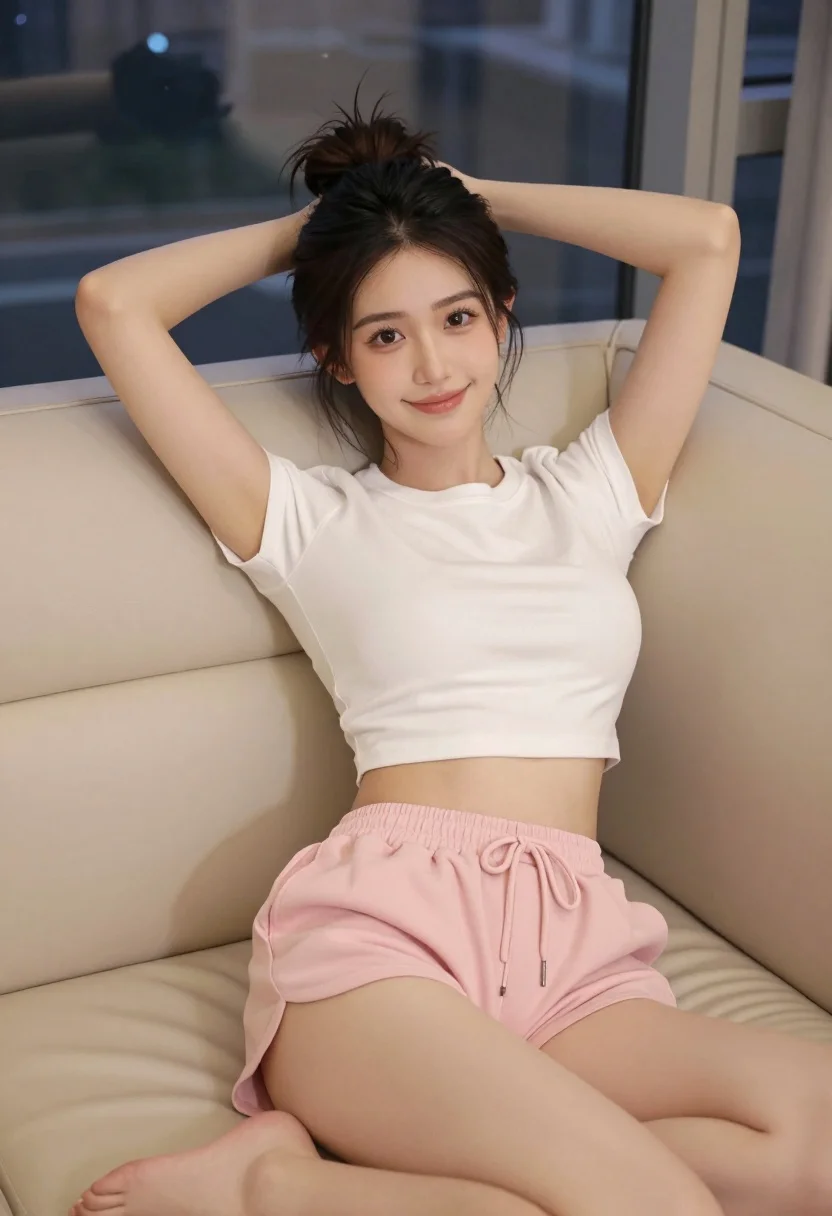
Young woman reclining on beige leather sofa overlooking blurred cityscape at night
Prompt
A young woman with dark hair tied in a messy bun reclines on a beige leather sofa with her arms resting behind her head.

Subject: A young woman with dark brown hair pulled up into a high, slightly messy bun and loose strands framing her face. She has a fair complexion, defined eyebrows, and is looking directly at the camera with a soft, confident smile.

Clothing: She wears a plain white short-sleeved crop top that reveals her midriff and light pink drawstring shorts.

Action: She is leaning back against the sofa cushions in a relaxed pose, with both arms bent and hands clasped behind her head, legs extended forward.

Environment: The setting is an indoor room featuring a large window in the background showing a blurred cityscape at night with illuminated buildings.

Camera: High-angle shot looking down at the subject, capturing her full upper body and legs on the couch.

Lighting: Soft, warm indoor lighting illuminates her skin evenly, creating gentle shadows that define her form without harsh contrast.

Style Details: Photorealistic style with high detail in skin texture and fabric folds, rendered with a smooth finish typical of modern digital photography or AI generation.
Description
This prompt is useful for creating intimate portraiture for lifestyle magazines, mood boards depicting sophisticated downtime, and character concept art for narrative projects. The combination of 'soft, warm indoor lighting' with the 'beige leather sofa' ensures that while the background cityscape provides visual interest, the subject remains softly illuminated and grounded in a luxurious setting, preventing harsh contrast that would distract from her 'soft, confident smile'.
Suggestions
- Change 'plain white short-sleeved crop top' to 'silk camisole' for more texture.
- Swap 'beige leather sofa' for 'velvet chaise lounge' to alter the material feel.
- Adjust 'high-angle shot looking down' to 'eye-level medium shot' for a more direct connection with the viewer.
Category
Tags
BrunetteFair SkinFemaleFull BodyHigh AngleMedium ShotRealistic
Date added
July 3, 2026
Added by
PromptDexter Team
Related Prompts
More prompts with similar categories and tags.
Young woman pointing playfully at cheek in deep red studio dress
Young woman in navy embroidered traditional dress indoors medium shot
Glamorous woman with red curls leaning on tree holding pink flowers
Young woman in black slip dress standing by window in bright bedroom
Young woman in red top and white trousers on city sidewalk at

Photorealistic portrait of woman in red gold armor holding shield studio shot

Young woman in pink camisole standing in sunlit rolling hills
Blonde woman in black hat standing in misty green rolling hills

Smiling young woman in sweater vest within sunny autumn park setting

Young woman in olive saree leaning on railing outdoors during golden hour