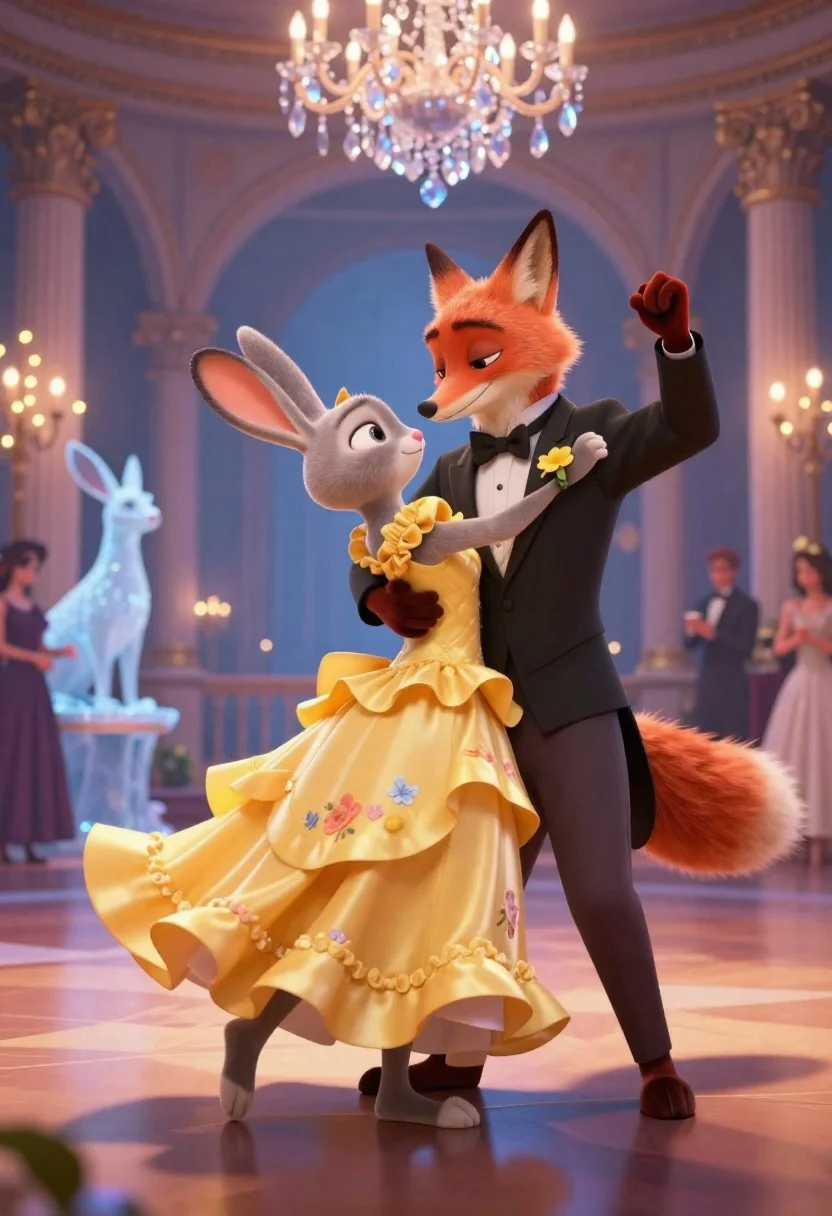
Anthropomorphic fox in tuxedo dances with rabbit in yellow dress under crystal
Prompt
A romantic ballroom scene featuring an anthropomorphic fox in a tuxedo and a rabbit in a yellow dress dancing together under a crystal chandelier.

Subject: A tall orange fox with large ears and a bushy tail wearing a formal black tuxedo, bow tie, and white shirt, holding hands with a small grey rabbit wearing a bright yellow floral dress with ruffled layers.

Clothing: The fox wears a tailored black suit jacket, trousers, and brown shoes with a black bow tie and a yellow flower boutonniere; the rabbit wears a vibrant yellow gown with a textured bodice and layered skirt.

Action: The pair are mid-dance in a waltz pose, holding hands with one arm raised, smiling gently at each other with soft expressions.

Environment: An elegant indoor ballroom with arched white columns, glowing fairy lights on trees, ice sculptures of animals in the background, and a large crystal crown chandelier hanging from above.

Camera: Medium shot capturing both characters from the waist up, slightly low angle to emphasize height difference, shallow depth of field blurring distant guests and decorations.

Lighting: Soft ambient lighting with warm highlights on faces and clothing, cool blue tones in the background creating contrast, gentle shadows under feet and dress folds.

Style Details: 3D animated style resembling high-end CGI film renderings, smooth textures, polished surfaces, vibrant colors, cinematic composition, subtle motion blur on dress hem suggesting movement.
Description
This prompt is useful for creating whimsical character concept art, narrative scene illustrations, and stylized advertising campaigns for fictional brands. The combination of 'soft ambient lighting with warm highlights' against 'cool blue tones in the background' establishes a dramatic contrast that prevents the vibrant yellow dress from looking flat, while the 'shallow depth of field' keeps focus tightly on the couple during their waltz pose.
Suggestions
- Change 'yellow floral dress' to 'gold silk gown' for more luxury.
- Adjust 'low angle' to 'eye-level shot' for a more intimate feel.
- Swap 'crystal chandelier' for 'stained glass window' to alter the light source.
Category
Tags
3dBlack HairFictional CharacterFormal WearFull BodyIndoorsLow AngleMedium ShotOutdoorsRealistic
Date added
June 26, 2026
Added by
PromptDexter Team
Related Prompts
More prompts with similar categories and tags.

Full body studio shot of woman and anthropomorphic fox character
3d render of cute tiger cub with bicycle in studio

Woman in police uniform stands with fox wearing shirt against white studio
Two friendly cartoon cats standing side by side against a blue background
Cheerful plush toy boy holding a teal walkie talkie on a grassy

Three animated characters standing together against a solid blue background

Full body studio portrait of woman with two animated animal friends
Woman in black blazer holding grey and white cat on leather armchair
