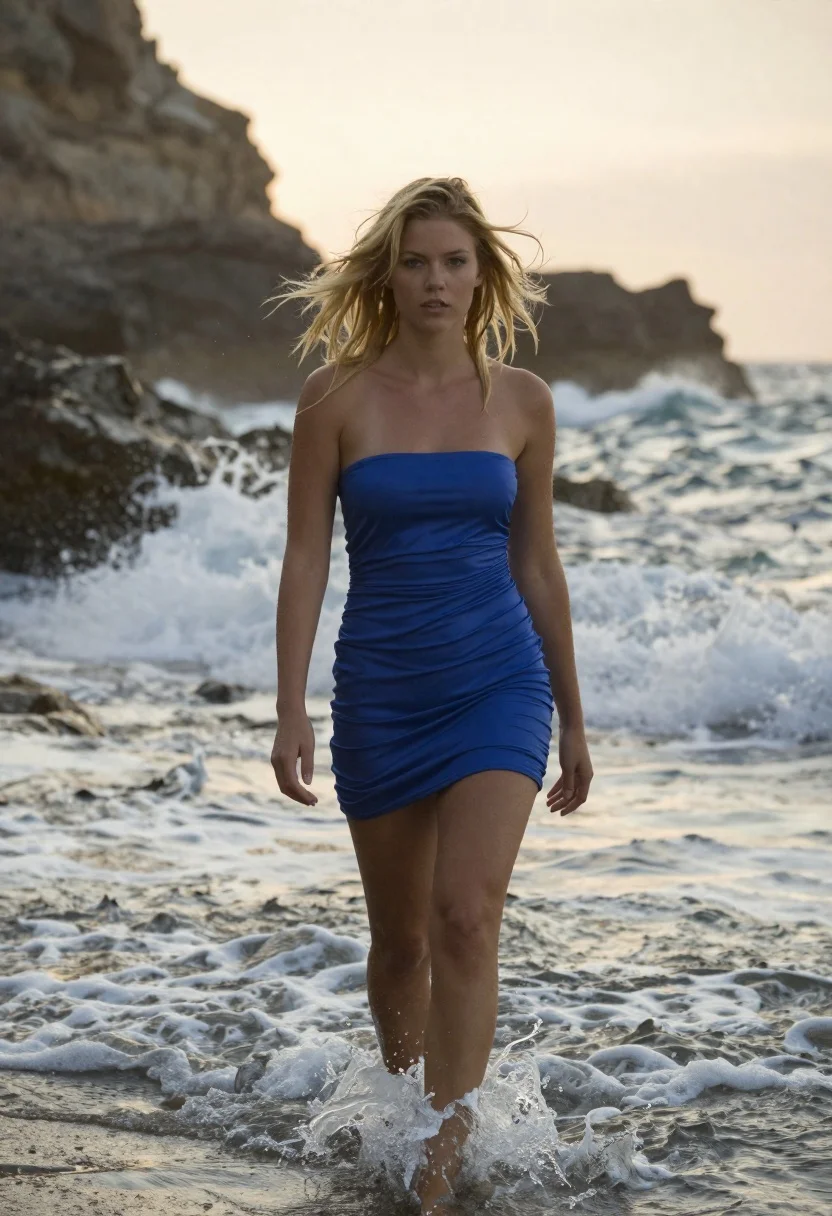
Blonde woman walking through shallow ocean water at golden hour
Prompt
A young woman with windswept blonde hair walks through shallow ocean water toward the camera.

Subject: A fair-skinned woman with a slender build and messy, windblown shoulder-length blonde hair that appears damp from the sea spray. Her expression is serious and direct as she looks straight ahead.

Clothing: She wears a strapless, royal blue mini dress made of a smooth, slightly shiny fabric that clings to her figure. The dress has horizontal ruching across the bodice and a gathered waistline.

Action: She walks forward with a relaxed posture, her arms hanging loosely by her sides. Her gaze is fixed on the viewer, and water droplets are visible in the air around her hair and shoulders.

Environment: The setting is a rocky coastline during sunset or sunrise. Behind her, white ocean waves crash onto the shore, creating a dynamic splash of foam. In the background, a blurred rocky cliff rises from the sea under a warm, hazy sky.

Lighting: Soft, golden hour sunlight illuminates the scene from behind and above, casting a warm glow on her hair and skin while leaving parts of her face in soft shadow. The light creates a dreamy, ethereal atmosphere with high contrast between the bright highlights and darker water tones.

Camera: Shot at eye level with a shallow depth of field that keeps the woman sharply in focus while blurring the crashing waves and distant cliffs behind her. The composition centers her vertically, emphasizing her movement through the water.

Style Details: Cinematic photography style with naturalistic color grading, soft film grain, and a moody coastal aesthetic.
Description
This prompt is useful for creating cinematic travel editorials, high-end swimwear lookbooks, and atmospheric narrative stills. The combination of 'soft, golden hour sunlight' casting highlights on the 'damp from the sea spray' hair, paired with a shallow depth of field that blurs the crashing waves, directs all focus onto the subject's movement while establishing an ethereal mood.
Suggestions
- Change 'royal blue mini dress' to 'sheer white sundress' for a more ethereal look.
- Add 'anamorphic lens flare' to enhance the cinematic quality.
- Swap 'rocky coastline' for 'sandy beach with tide pools' to change the foreground texture.
Category
Tags
BeachBlondeCasual WearFair SkinFemaleFull BodyRealistic
Date added
June 19, 2026
Added by
PromptDexter Team
Related Prompts
More prompts with similar categories and tags.
Fair skinned woman in white coat stands in snowy city street at
Young blonde woman in green polka dot dress standing in subway tunnel

Blonde woman in black gown posing on city street near ritz london
Young woman with brown hair leaning on yellow pillar during golden hour
Young blonde woman in black slip dress leaning in luxurious bathroom doorway
Blonde woman in white coat dress seated in grand hotel lobby
Young blonde woman in white lace dress standing in blue doorway
Fair blonde woman in red dress and floral jacket indoors
Blonde woman in champagne gown walking down theater aisle spotlight

Close up portrait of young woman with pink bob hair in nightclub