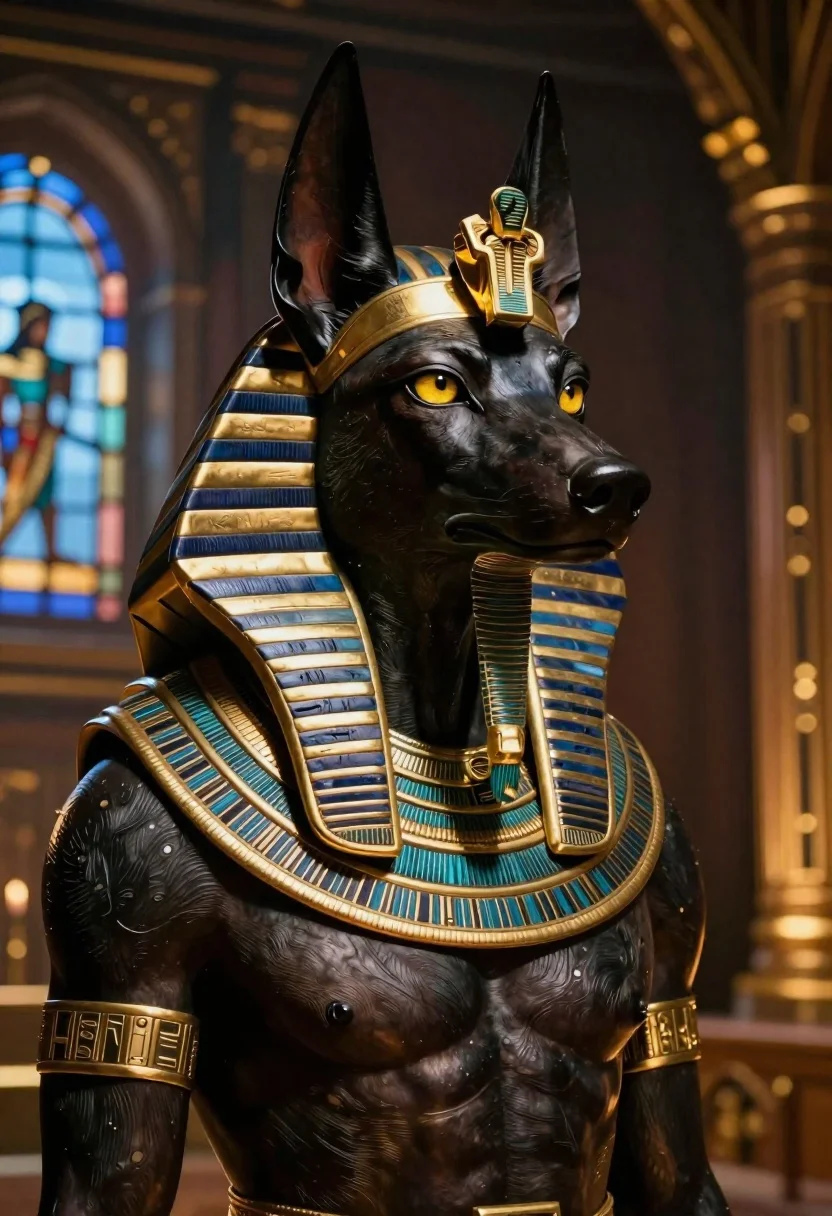
Hyperrealistic jackal figure in ancient egyptian regalia
Prompt
Hyper-realistic close-up of a dark-skinned canine figure resembling Anubis with golden eyes and an intense gaze; Subject is a muscular humanoid jackal head wearing ornate ancient Egyptian regalia including the nemes headdress, khepresh crown element on forehead, broad collar necklace, and circular pendant chest piece.

Clothing: intricately detailed gold-and-blue striped collars and shoulder armor with hieroglyphic engravings; golden earring-like ornamentation framing ears.

Action: stoic posture facing slightly rightward while gazing directly forward at viewer.

Environment: dimly lit interior space featuring warm ambient glow from background stained-glass window filtering cool blue light against dark wooden architecture.

Lighting: dramatic chiaroscuro lighting highlighting facial contours and metallic textures with soft shadows accentuating musculature depth; golden rim-light enhances profile edges.

Style Details: cinematic 8K resolution rendering blending mythological grandeur with photorealistic skin texture fidelity in hyper-detailed digital art style.
Description
This prompt is useful for creating concept art for fantasy video games, character portraits for mythology anthologies, and high-end collectible statue visualizations. The combination of 'dramatic chiaroscuro lighting' with a 'golden rim-light' sculpts the jackal figure's musculature depth and metallic textures, which prevents the ornate regalia from looking flat against the dark wood backdrop.
Suggestions
- Change 'dark-skinned canine figure' to specify skin tone variations like 'deep obsidian skin'.
- Swap 'gold-and-blue striped collars' for 'lapis lazuli and electrum accents' for a richer palette.
- Adjust 'dimly lit interior space' to include 'sandstone pillars' to ground the setting.
Category
Tags
3dAnimalsClose UpCreatureDark SkinMalePortrait Shot
Date added
June 19, 2026
Added by
PromptDexter Team
Related Prompts
More prompts with similar categories and tags.
Three disney characters on a tropical grassy rock

Futuristic soldier in heavy snowfall on an urban street

Obsidian humanoid in neon cube holding glowing heart

Hyperrealistic caricature sculpture of a man sitting
Cyborg woman in hoodie with glowing amber circuitry amidst floating autumn leaves

Cartoon portrait of black man with diamond grillz

Cartoon bunny head portrait with large black eyes
Fiery rider on horseback against apocalyptic sky