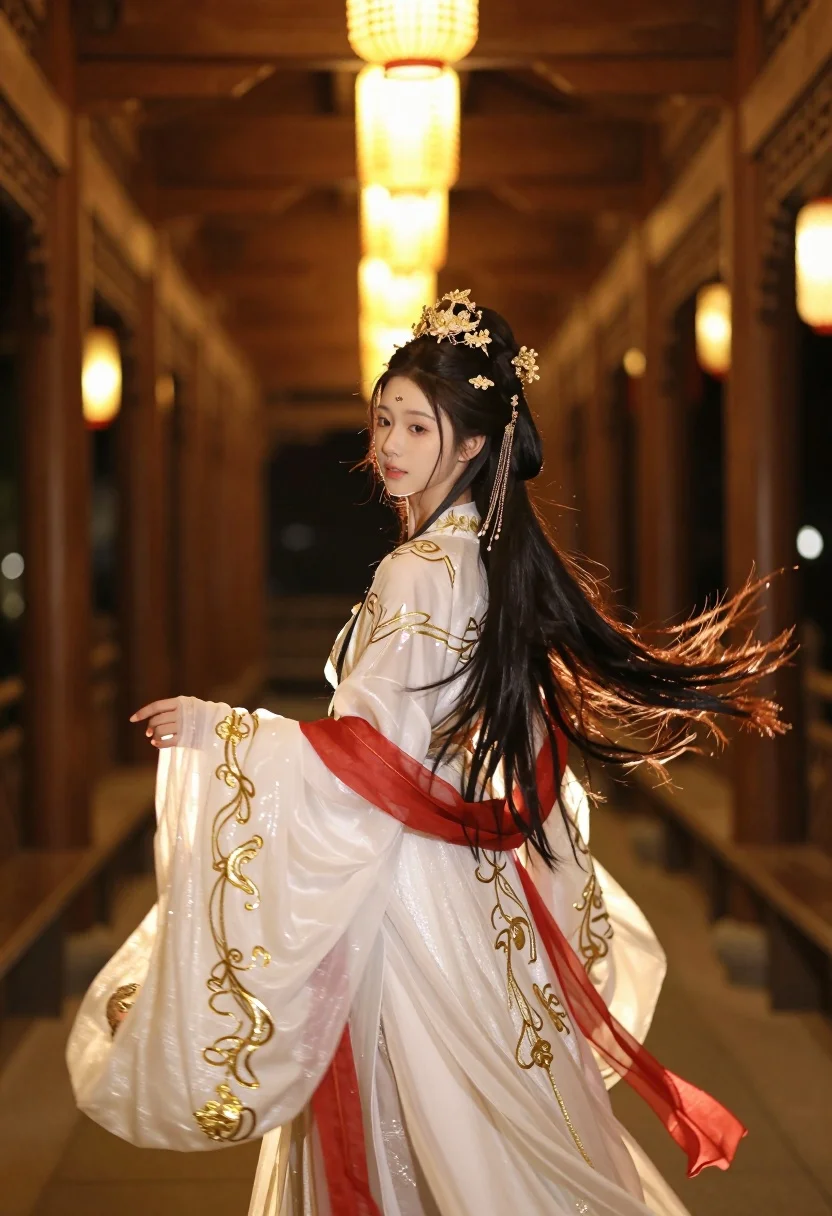
Young woman in white hanfu gown looking back through wooden corridor
Prompt
A young woman with long dark hair stands in a traditional wooden corridor illuminated by warm lantern light.

Subject: A beautiful young woman with fair skin and delicate features, her long dark hair flowing freely behind her adorned with an elaborate golden headdress featuring floral motifs and dangling chains.

Clothing: She wears an intricate white hanfu-style gown embellished with gold embroidery and shimmering threads, accented by flowing red sashes that trail through the air.

Action: Her body is turned slightly away from the camera while she looks back over her shoulder with a soft expression, her hair and fabric caught in a gentle breeze.

Environment: The setting is an ornate traditional wooden corridor lined with hanging lanterns that cast a golden glow, creating a sense of depth and perspective along the walkway.

Lighting: Warm ambient light filters through the lanterns, highlighting the texture of her dress and creating soft highlights on her skin and hair against a softly blurred background.

Camera: The shot is framed from behind and to the side with a shallow depth of field that keeps the subject sharp while blurring the corridor into bokeh lights.

Style Details: The image features a cinematic, ethereal aesthetic with high detail in the fabric textures and lighting effects, rendered with a soft focus and dreamlike atmosphere.
Description
This prompt is useful for creating historical costume concept art, atmospheric narrative scenes, and editorial mood boards inspired by East Asian aesthetics. The combination of 'warm ambient light' filtering through the lanterns and the 'shallow depth of field' ensures that while the intricate details of the white hanfu-style gown remain sharp, the surrounding wooden corridor dissolves into bokeh lights, directing all focus onto the subject's ethereal presence.
Suggestions
- Change 'golden headdress featuring floral motifs' to 'jade and pearl headdress' for a different color story.
- Swap 'red sashes' for 'deep sapphire sashes' to contrast with the gold embroidery.
- Adjust 'softly blurred background' to 'visible architectural details' if you want less abstraction.
Category
Tags
Fair SkinFemaleFull BodyOver The ShoulderRealisticTraditional Wear
Date added
July 3, 2026
Added by
PromptDexter Team
Related Prompts
More prompts with similar categories and tags.

Woman crawling on dusty hillside in black leather outfit low angle
Blonde woman in champagne gown walking down theater aisle spotlight
Woman in art deco gown on fire escape looking back over shoulder
Woman in black strapless gown leaning against upscale hotel hallway wall
Young woman in red sari sitting on sand dunes at golden hour
Young woman in pink lace gown standing in misty wildflower field
Fair skinned woman in white coat stands in snowy city street at
Woman in green gown stands in sunlit forest with blooming trees
Graceful woman in teal chinese gown by moonlit waterfront architecture at night

Blonde woman in black gown posing on city street near ritz london