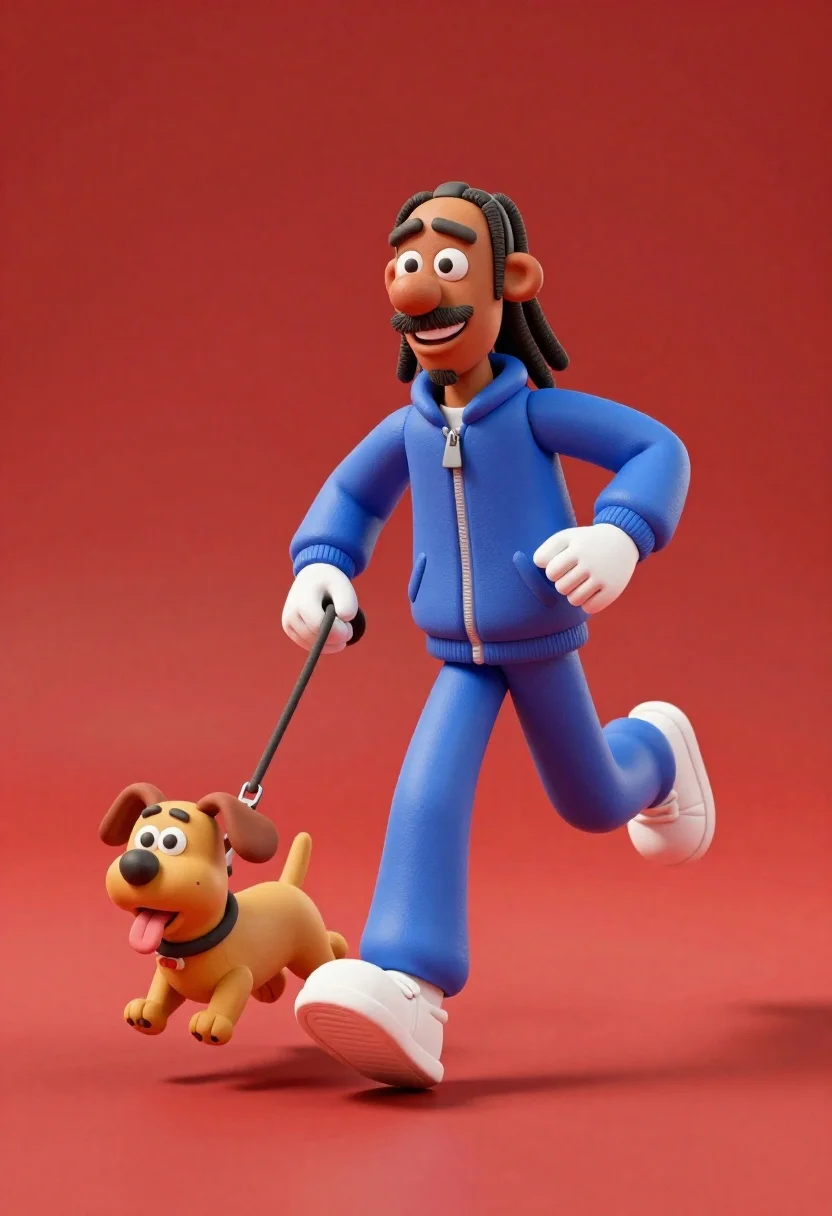
3d animated snoop dogg character running with small dog on leash
Prompt
A joyful 3D animated character resembling Snoop Dogg running alongside a small dog on a leash against a solid red background.

Subject: A stylized 3D male figure with dark skin, dreadlocks tied back, and a goatee, wearing a wide smile.

Clothing: He wears a matching blue tracksuit consisting of a zip-up jacket and pants, paired with white sneakers and white gloves.

Action: The character is captured mid-stride in a running pose, leaning forward slightly while holding a leash attached to the dog.
Second

Subject: A small, light brown cartoon dog with floppy ears, a black nose, and its tongue sticking out, also running energetically.

Objects: A thin leash connects the character's gloved hand to the dog's collar.

Environment: The scene is set against a seamless, vibrant red background that extends to the floor, creating a minimalist studio setting.

Lighting: Soft, diffuse lighting illuminates the subjects from above and slightly in front, casting gentle shadows on the ground and highlighting the rounded forms of the characters.

Camera: A medium shot captures both figures at eye level with a slight low angle to emphasize their movement, utilizing a shallow depth of field that keeps the foreground sharp while softening the background.

Style Details: The image features a high-quality 3D render style with smooth textures resembling clay or plasticine, vibrant saturated colors, and a clean, polished aesthetic typical of modern animation.
Description
This prompt is useful for creating character concept art for animated shorts, mascot designs for pet brands, and stylized album artwork. The combination of 'smooth textures resembling clay or plasticine' with the 'low angle' perspective ensures that the characters feel tangible yet highly stylized, which supports both a playful mascot aesthetic and a dynamic, energetic composition.
Suggestions
- Change 'solid red background' to 'vibrant teal background' for color contrast.
- Swap 'blue tracksuit' for 'lime green tracksuit' to increase visual pop.
- Adjust 'medium shot' to 'full body shot' to better capture the running motion.
Category
Tags
3dDark SkinLow AngleMaleMedium Shot
Date added
June 23, 2026
Added by
PromptDexter Team
Related Prompts
More prompts with similar categories and tags.

Three animated characters standing together against a solid blue background

Cheerful chibi pirate character standing on treasure chest in studio

Woman in police uniform stands with fox wearing shirt against white studio
Young man smiling selfie surrounded by colorful angry birds characters
Cheerful plush toy boy holding a teal walkie talkie on a grassy

Full body studio shot of woman and anthropomorphic fox character

Woman in pink suit presenting ring box to large red reindeer mascot
Young man with dog sitting on black land rover at night