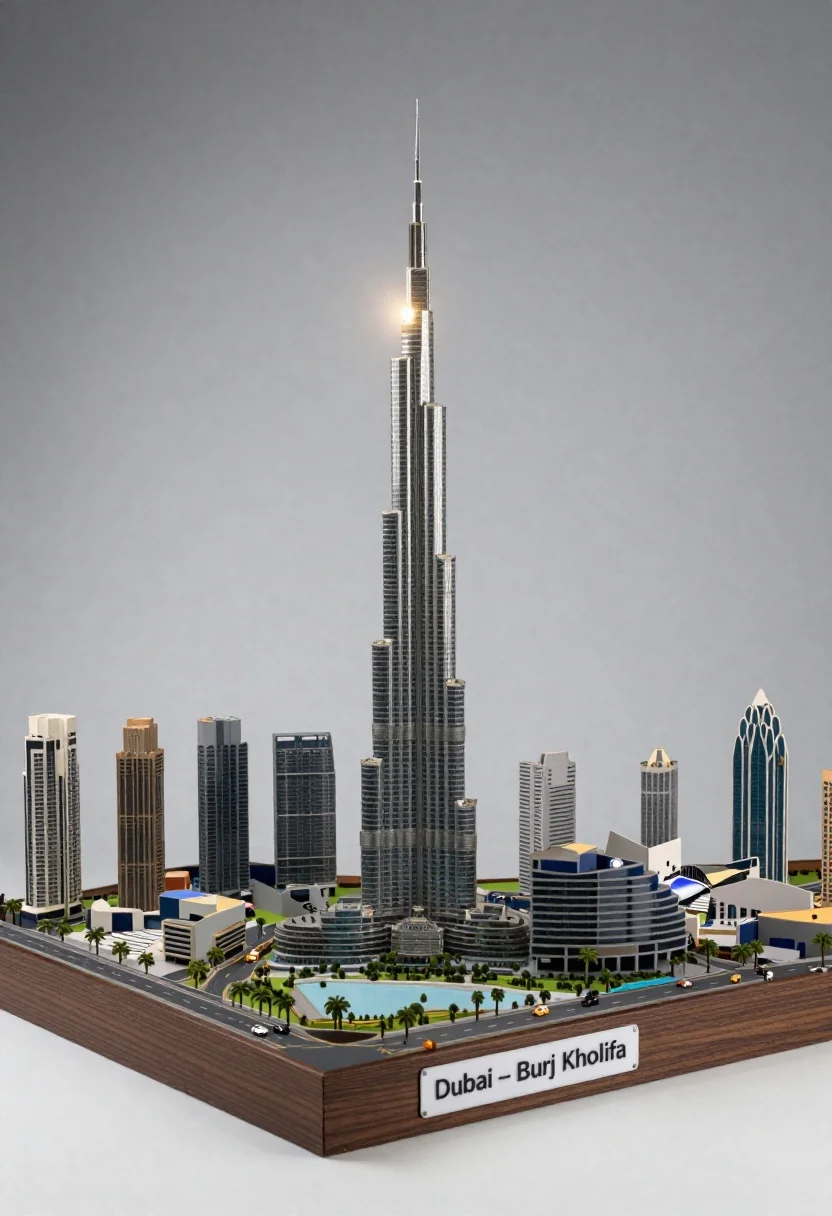
Detailed architectural model of dubai skyline with skyscraper and tiny cars
Prompt
A detailed architectural model of the Dubai skyline featuring a towering skyscraper at its center surrounded by smaller high-rise buildings and streets with tiny cars.

Subject: A miniature architectural model set on a dark wooden base, dominated by a tall, slender skyscraper resembling the Burj Khalifa.

Clothing: Not applicable as the scene depicts an architectural model without human figures or attire.

Action: The model is static, showcasing a city layout with roads, palm trees, and buildings arranged around the central tower.

Environment: A neutral gray studio background that fades into white at the bottom, emphasizing the model as the focal point.

Camera: Shot from a slightly elevated angle looking down at the model, capturing the full base and height of the central tower.

Lighting: Soft overhead lighting creates a gentle glow around the top of the central skyscraper, with subtle shadows defining the depth of the model.

Second

Subject: None visible in the scene.

Objects: Tiny cars on roads, palm trees lining streets, and various smaller buildings surrounding the main tower.

Interaction: No interaction between subjects or objects as this is a static architectural display.

Text/Graphics: A label on the front of the wooden base reads "Dubai – Burj Khalifa" in black text on a white background.

Style Details: Photorealistic rendering with clean lines, high detail, and a focus on architectural precision and scale.
Description
This prompt is useful for creating presentation visuals for urban planning proposals, concept art for miniature dioramas, and detailed product photography showcasing small-scale models. The combination of 'dark wooden base' and 'neutral gray studio background' isolates the subject matter, ensuring that the 'photorealistic rendering with clean lines' keeps all focus on the architectural precision rather than distracting environmental elements.
Suggestions
- Change 'dark wooden base' to 'polished black acrylic base' for a more modern feel.
- Add 'macro photography' to emphasize the tiny cars and details.
- Swap 'soft overhead lighting' for 'dramatic side lighting' to enhance shadow depth.
Category
Tags
Full BodyOutdoorsRealisticStudioWide Shot
Date added
June 26, 2026
Added by
PromptDexter Team
Related Prompts
More prompts with similar categories and tags.

Cute clay panda figurine eating bamboo on a green base

Full body studio shot of woman standing between large mario and luigi

Young woman standing confidently between two large sonic the hedgehog characters

Full body studio shot of woman and anthropomorphic fox character
Large headed cartoon caricature standing in front of real life man in

Obsidian humanoid in neon cube holding glowing heart

Stylized woman with long neck in white feathered gown
Majestic white neoclassical building with a grand portico stands under blue sky