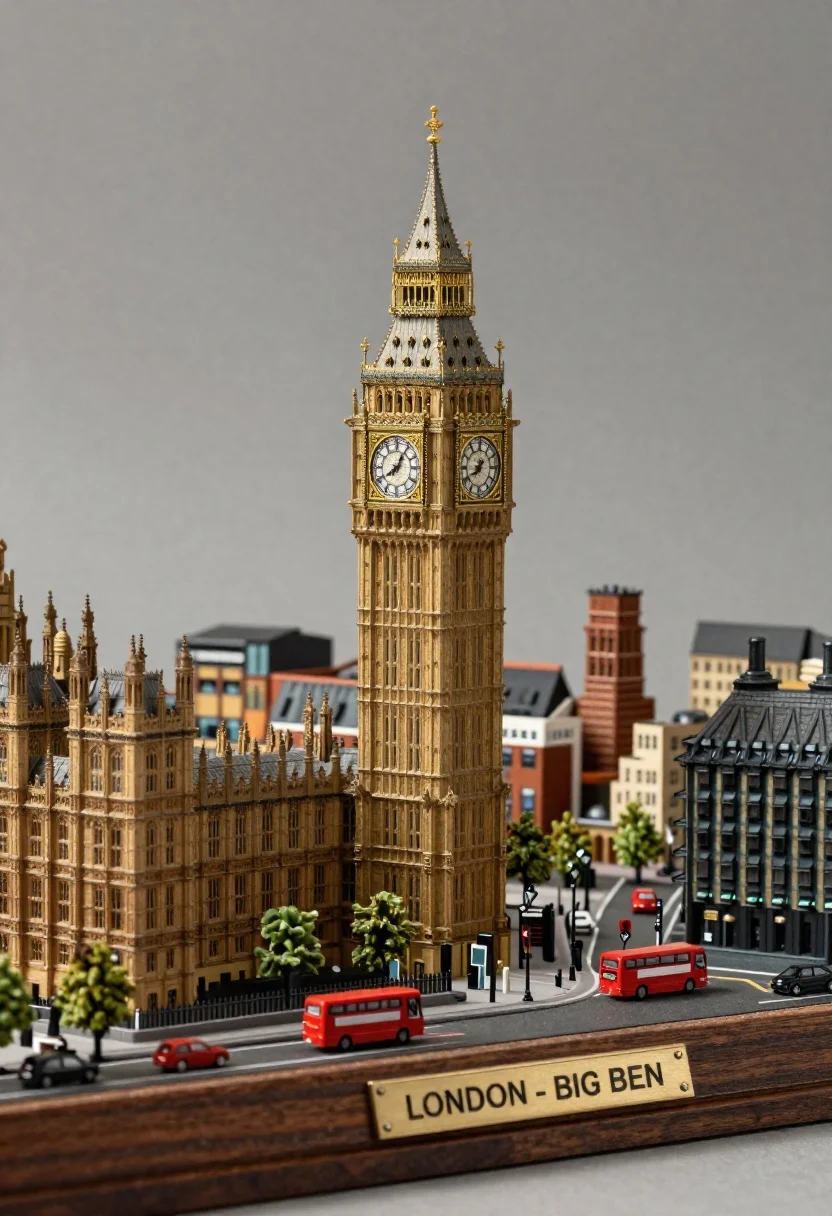
Photorealistic miniature diorama of london skyline with big ben clock tower
Prompt
A highly detailed miniature diorama of the London skyline featuring the iconic Big Ben clock tower as the central subject.

Subject: A towering replica of the Elizabeth Tower (Big Ben) with intricate Gothic Revival architecture and a large clock face, surrounded by smaller brick buildings representing Westminster.

Clothing: Not applicable to the architectural model.

Action: The scene is static, depicting a miniature city layout on a display base.

Environment: The diorama sits on a polished wooden platform with a brass plaque reading "LONDON - BIG BEN" at the front; the background is a plain, neutral studio backdrop.

Camera: A high-angle shot looking down at the model to capture the full layout and depth of the miniature city.

Lighting: Soft, diffused studio lighting from above creates gentle highlights on the tower's spire and casts subtle shadows within the streets.
Second

Subject: None.

Objects: Tiny red double-decker buses, small cars, trees, and street lamps are scattered throughout the miniature streets.

Interaction: Not applicable to a static architectural model.

Text/Graphics: A brass plaque at the base of the display reads "LONDON - BIG BEN".

Style Details: Photorealistic 3D rendering with high texture detail, resembling a high-end collectible model or architectural visualization.
Description
This prompt is useful for creating architectural visualization concepts, detailed product photography mockups, and diorama display art. The combination of 'high-angle shot' and 'soft, diffused studio lighting from above' ensures that the viewer perceives the entire miniature layout and depth without harsh shadows obscuring the intricate details of the Gothic Revival architecture.
Suggestions
- Change 'polished wooden platform' to 'slate grey base' for a more industrial feel.
- Add 'macro lens perspective' to emphasize the tiny scale.
- Swap 'brass plaque' for 'etched metal plate' for a different metallic sheen.
Category
Tags
3dFull BodyHigh AngleRealisticStudioUrbanVehicle
Date added
June 26, 2026
Added by
PromptDexter Team
Related Prompts
More prompts with similar categories and tags.

Cheerful young man taking selfie while standing on giant smartphone screen

Glossy futuristic capsule diorama containing miniature cityscape on marble

Glossy white capsule containing miniature city diorama on stone near lake
Young man flanked by fox and rabbit at snowy train platform

Woman in police uniform stands with fox wearing shirt against white studio

Macro photograph of miniature man seated in palm hand

Young man and blue robotic cat riding bicycles down a sunny street

High angle view of historic city square pagoda temples at twilight