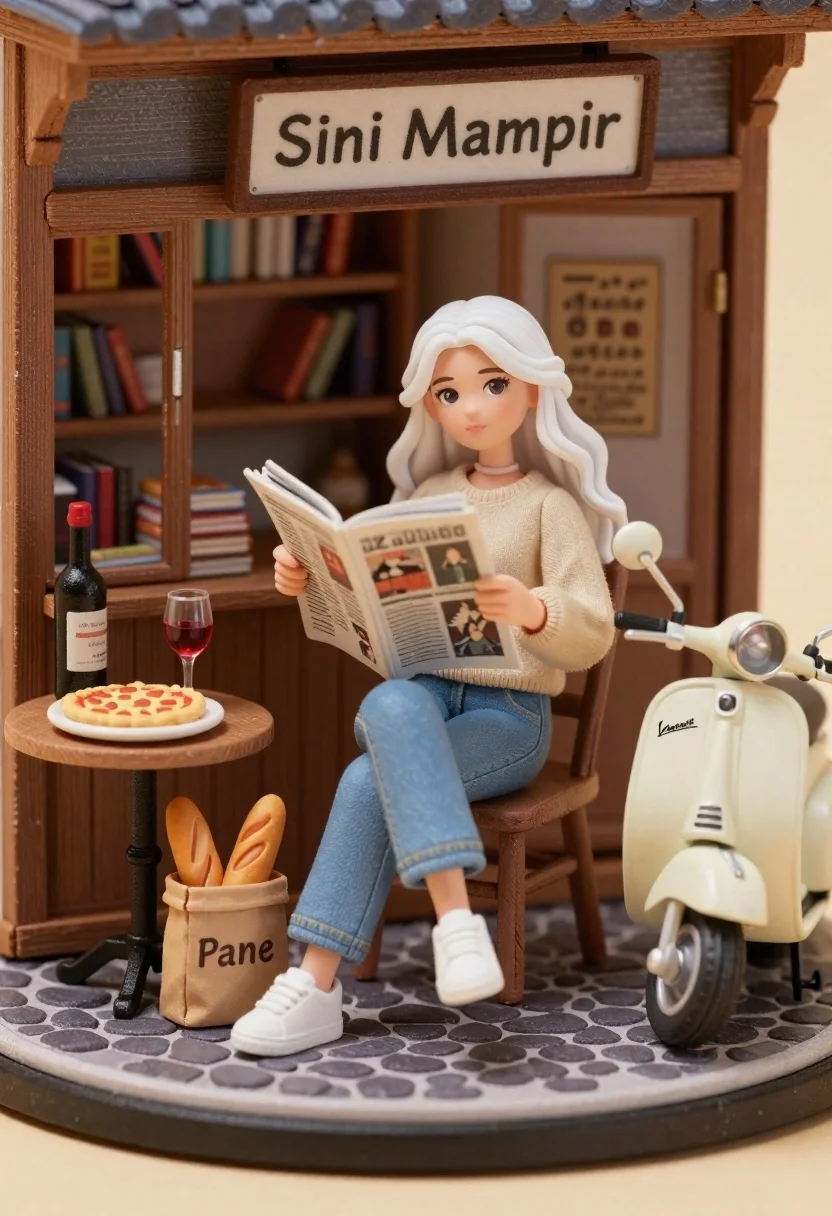
Miniature diorama of young woman reading newspaper in rustic storefront
Prompt
A miniature diorama featuring a young woman with long white hair sitting on a wooden chair inside a cozy, rustic storefront reading a newspaper.

Subject: A young woman with long wavy white hair and fair skin, wearing a beige sweater and blue jeans, seated comfortably in a relaxed pose while holding an open newspaper.

Clothing: She wears a soft beige crewneck sweater, faded blue denim jeans, and white sneakers.

Action: The woman is seated on a wooden chair, holding a newspaper open with both hands, looking directly at the viewer with a calm expression.

Environment: A miniature diorama set inside a rustic wooden storefront with a sign reading "Sini Mampir," featuring built-in bookshelves filled with books in the background and a cobblestone floor base.

Objects: A small wooden table holds a plate of pizza, a glass of red wine, and a bottle of wine; a brown paper bag labeled "Pane" sits on the floor containing two baguettes; a cream-colored Vespa scooter is parked to the right.

Lighting: Soft, diffused lighting illuminates the scene evenly with gentle shadows, creating a warm and inviting atmosphere without harsh contrasts.

Camera: Close-up shot capturing the entire diorama on a circular base, framed at eye level to emphasize the miniature scale and depth of field.

Style Details: Highly detailed miniature art style with realistic textures on wood, fabric, and metal, rendered in a clean, high-fidelity 3D aesthetic.
Description
This prompt is useful for creating highly detailed tabletop vignettes, cozy lifestyle advertisements, and collectible diorama artwork. The combination of 'soft, diffused lighting' with the specified 'highly detailed miniature art style' ensures that every element—from the 'faded blue denim jeans' to the 'cobblestone floor base'—retains visible texture without harsh shadows, which is crucial for selling the illusion of a small, lived-in scene.
Suggestions
- Change 'beige sweater' to 'cream knit cardigan' for more visual interest.
- Add 'bokeh effect' to the camera details for background separation.
- Swap 'pizza' for 'croissant' on the wooden table for a different culinary focus.
Category
Tags
3dCasual WearClose UpFair SkinFemaleIndoors
Date added
June 26, 2026
Added by
PromptDexter Team
Related Prompts
More prompts with similar categories and tags.

Portrait of young woman with brown skin and floral dress in 3d

Closeup portrait of woman with white marble skin and glossy black liquid

Young woman with silver hair sits at desk in modern recording studio

Closeup portrait of stylized female art doll figure with brown hair

Handsome man taking a selfie with anime character goku in a cozy
Anime girl portrait with glasses and gold spiked tie on magazine background

Confident young woman in maroon shirt sitting in brown leather chair with

Glamorous woman taking mirror selfie in sheer sequined top
