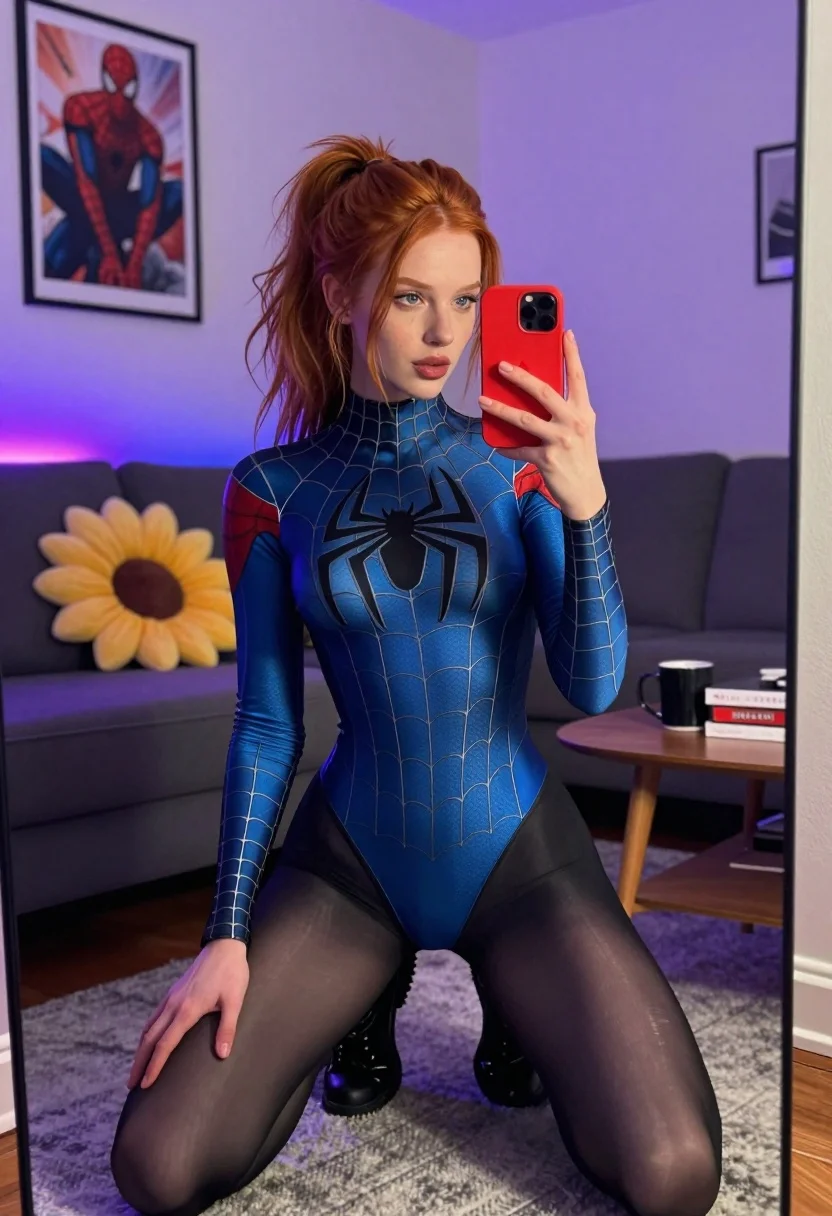
Red haired woman in spider man bodysuit taking a mirror selfie indoors
Prompt
A young woman with red hair tied in a high ponytail takes a mirror selfie while sitting on a dark grey sofa.

Subject: A fair-skinned woman with long red hair pulled back into a messy high ponytail, featuring loose strands framing her face and blue eyes looking directly at the camera.

Clothing: She wears a tight-fitting blue Spider-Man bodysuit with a large black spider emblem on the chest and web patterns across the torso, paired with sheer black thigh-high stockings and black lace-up boots.

Action: She holds a red smartphone in her left hand to capture the reflection, while her right hand rests gently on her knee.

Environment: The setting is a modern living room featuring a dark grey sectional sofa, a large yellow sunflower-shaped pillow, a wooden coffee table with books and a mug, and a framed Spider-Man movie poster hanging on the wall behind her.

Lighting: The scene is illuminated by ambient room light mixed with distinct purple and blue neon glow lights in the background, creating a cool-toned atmosphere.

Camera: A vertical mirror selfie shot taken from a medium distance, capturing the full figure of the subject within the reflection of a large floor mirror.

Style Details: High-resolution photography with realistic textures on the fabric and skin, utilizing a shallow depth of field to keep the subject sharp while slightly softening the background elements.
Description
This prompt is useful for creating character concept art, themed cosplay photography, and narrative scene visualizations for comic book adaptations. The combination of 'blue Spider-Man bodysuit' against a backdrop featuring 'purple and blue neon glow lights' establishes a specific, high-contrast urban aesthetic that grounds the subject in a stylized, non-naturalistic environment suitable for genre fiction.
Suggestions
- Change 'dark grey sofa' to 'velvet chaise lounge' for a richer texture.
- Swap 'red smartphone' for 'chrome phone' to match the sci-fi feel.
- Adjust 'purple and blue neon glow lights' to 'cyan and magenta neon glow lights' for a more vibrant pop.
Category
Tags
Fair SkinFemaleIndoorsMedium ShotRealisticRed HairSelfie
Date added
July 12, 2026
Added by
PromptDexter Team
Related Prompts
More prompts with similar categories and tags.
Young woman in red lace outfit taking mirror selfie in festive hallway
Young woman taking mirror selfie in cozy living room setting
Young woman taking mirror selfie in luxurious bedroom setting

Young woman in festive red sequin dress taking mirror selfie indoors

Blonde woman taking mirror selfie on beige carpet near anime display

Glamorous woman taking mirror selfie in sheer sequined top
Woman taking a mirror selfie in minimalist bright room
Blonde woman mirror selfie wearing elaborate floral bodysuit indoors

Woman in cream pantsuit on private jet with wine

Close up selfie of woman in straw hat inside vehicle interior