
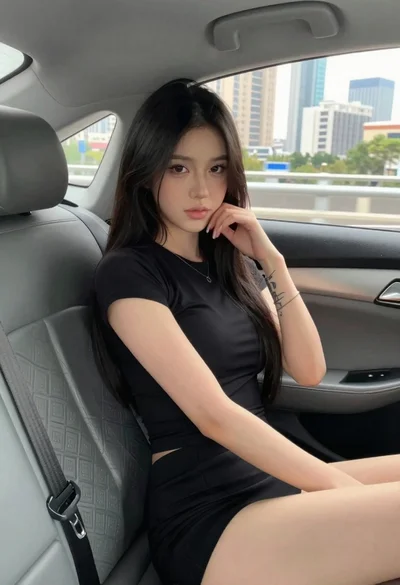
Young woman in black dress sitting inside car looking at camera
Prompt
A young woman with long dark hair sits in the back seat of a car, gazing thoughtfully toward the camera.

Subject: A young woman with long, straight black hair and fair skin, featuring a visible tattoo on her left forearm.

Clothing: She wears a black off-the-shoulder dress that exposes her upper back and shoulders, paired with white ribbed socks.

Action: She is seated in a relaxed pose, leaning forward with her chin resting on her hands, looking directly at the viewer with a calm expression.

Environment: The interior of a car with grey upholstery, visible headrests, and windows showing a city skyline with tall buildings under a cloudy sky outside.

Camera: Shot from a low angle inside the vehicle, capturing the subject in a medium shot that emphasizes her posture and facial features.

Lighting: Natural daylight enters through the car windows, creating soft highlights on her skin and hair while casting gentle shadows within the cabin.

Style Details: The image has a candid, lifestyle photography aesthetic with a focus on natural textures and realistic color tones.
Description
This prompt is useful for creating cinematic character portraits, editorial street style features, and moody automotive advertising content. The combination of 'low angle' framing and 'natural daylight' entering through the windows sculpts the subject by highlighting her 'visible tattoo on her left forearm' while keeping the background city skyline muted enough to support a focused gaze.
Suggestions
- Change 'black off-the-shoulder dress' to 'velvet black slip dress' for richer texture.
- Swap 'grey upholstery' for 'dark brown leather' to deepen the mood.
- Add 'anamorphic lens flare' to enhance the cinematic quality.
Category
Tags
Black HairCasual WearFair SkinFemaleIndoorsLow AngleMedium ShotRealisticStreet
Date added
June 19, 2026
Added by
PromptDexter Team
Related Prompts
More prompts with similar categories and tags.

Close up portrait of blonde woman in black top inside luxury car
Young woman in black outfit sitting inside car looking at camera
Young east asian woman winking on red motorcycle arcade game in neon
Young woman sitting on black motorcycle at night street scene
Young woman on motorcycle at night looking back over shoulder urban scene
Blonde woman in black mini dress seated inside luxury car interior
Woman leaning on silver sports car in showroom
Young woman with brown hair sitting inside car looking at camera
Young woman in white top and floral skirt inside car window
Young woman with brown hair in car seat holding coffee drink