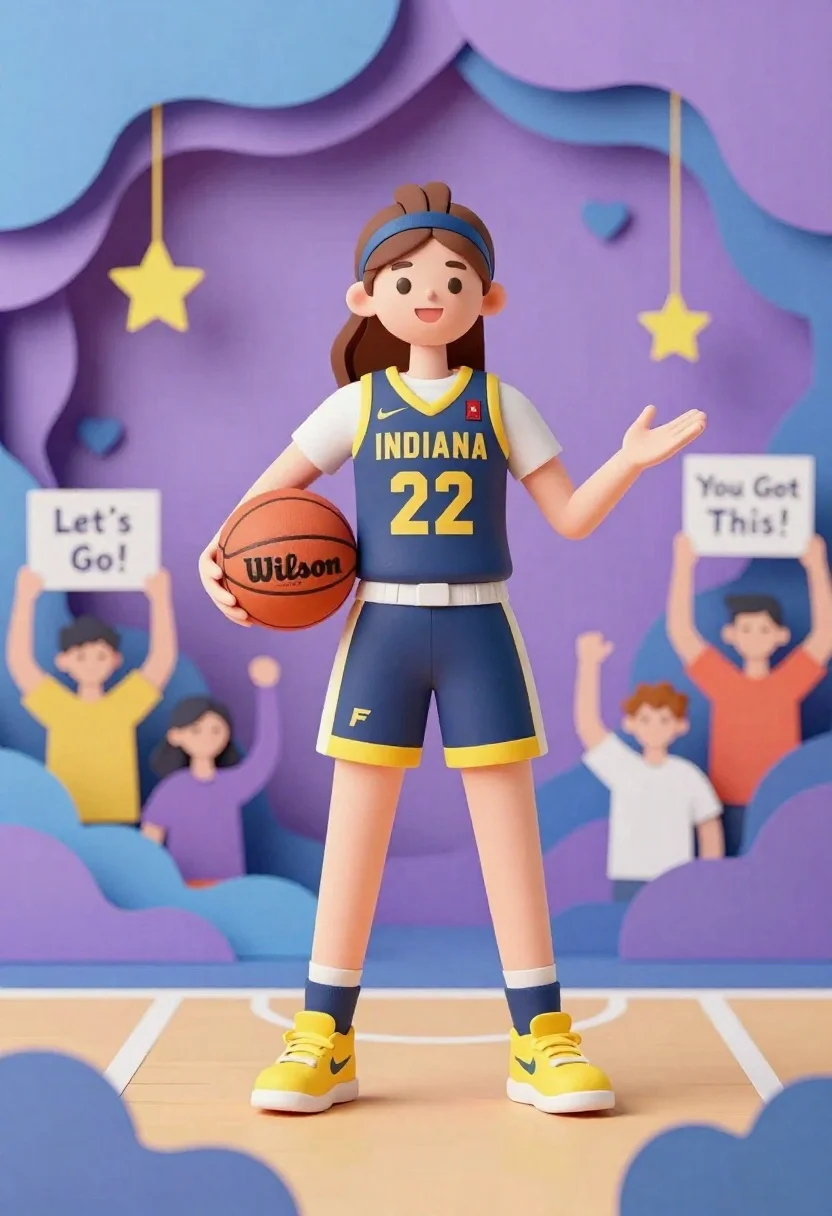
Cheerful female basketball player in navy jersey holding orange ball on court
Prompt
A cheerful paper-cutout style illustration of a female basketball player standing on a court holding a Wilson basketball.

Subject: A smiling young woman with brown hair tied back by a blue headband, wearing a navy blue Indiana jersey with yellow trim and the number 22 in gold.

Clothing: She wears a matching navy blue skirt with yellow piping and a stylized 'F' logo on the left leg, navy socks, and bright yellow sneakers.

Action: The player stands confidently holding an orange Wilson basketball in her right hand while extending her left arm outward as if gesturing to the crowd.

Environment: A vibrant paper-craft scene featuring layered purple and blue waves, hanging stars and hearts, and a cheering crowd of stylized fans holding signs that read "Let's Go!" and "You Got This!".

Camera: Eye-level medium shot with a shallow depth of field focusing on the player against the colorful background.

Lighting: Soft, even lighting typical of paper art with subtle shadows to create depth and dimensionality.

Style Details: Distinct 3D paper-cutout aesthetic with layered textures, pastel color palette, clean lines, and a whimsical artistic movement reminiscent of papercraft animation.
Description
This prompt is useful for creating vibrant sports event posters, children's book illustrations about athletics, and stylized merchandise designs. The combination of 'paper-cutout style illustration,' 'layered purple and blue waves,' and 'soft, even lighting' ensures a whimsical aesthetic that keeps the focus on the player while using graphic elements to suggest an energetic, celebratory atmosphere suitable for youth-oriented media.
Suggestions
- Change 'navy blue Indiana jersey' to 'royal blue university jersey' for a different team feel.
- Swap 'hanging stars and hearts' for 'geometric pennants' to make it look more structured.
- Adjust the 'shallow depth of field' to 'deep focus' if you want all background elements sharp.
Category
Tags
3dBrown HairFemaleFull BodyMedium ShotOutdoorsUniform
Date added
June 26, 2026
Added by
PromptDexter Team
Related Prompts
More prompts with similar categories and tags.
Cheerful young boy in blue france soccer jersey standing on a colorful
Hand holding clear capsule with miniature bobblehead soccer player

Woman in police uniform stands with fox wearing shirt against white studio
Young woman in pink puffer jacket standing by counter with minions
Young boy in yellow sweater hugged by blue robotic cat on blue

Three animated characters standing together against a solid blue background
Stylized funko pop figure of dragon tamer holding small green dragon
Woman with dark hair holding bow at outdoor archery range setting